주요 콘텐츠로 건너뛰기
수리 커뮤니티 가입 - 계정 만들기

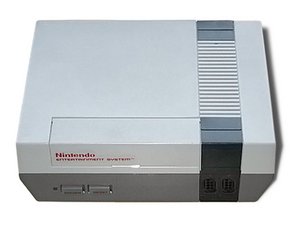
A game console released in North America by the Nintendo Company in 1985, called the Nintendo Entertainment System, model NES-001.

Blue screen after powering up NES

I recently found a dusty old NES, controller and some games (score!). The power light was blinking when i hooked it up, so i took it apart and cleaned it (and also disabled the 10NES chip). Put it back together, cleaned the game cartridges and hooked it all up. Now the power light is solid red, but the TV screen is a solid blue/purple color. I connected the NES to my TV via an AV Cable RF Box. Do I need a different kind of connector, or is it something else wrong with a component in the system itself? thanks in advance!

이 질문에 답하기 저도 같은 문제가 있습니다

좋은 질문입니까?

점수 2
댓글 1개

The same thing happens with Nintendo Wii. (caused by an error)

댓글 달기

답변 4개

가장 유용한 답변

Take a cotton swab and some medical isopropyl alcohol. If you have the option not to dip the cotton swab into the container, don’t do that, but I have still had decent results with doing so after drying a touch. Run the q-tip along the contacts of the game you are having the blue screen error with and you should see the tip turn golden or black because these carts had 30+ years to accumulate dirt. Finish cleaning both sides and dry with anything but your breath or you can just choose to oxidize the cart. It’s your choice, your game.

If option ^1 doesn’t do it for you, I’d go find a long Philips 1 screwdriver and prepare to spend 20min-1hr opening up your console so that you may depress the contacts on your NES. This can be achieved by using a thin yet sturdy fork to pull the contacts in your loader pins out towards you with as little malformation to the pins as possible. You may use the alcohol soaked q-tip method here as well in case your pins received a thorough enough dirt bath from your games.

These methods fixed every problem I’ve had and I’ve gone through all of the color codes. If you have any more questions, I would appreciate if we create a running dialogue for any others reading so that this ends up being the last post on the site about the blue error code. Have a good day and I wish you luck with your almost new plastic box.

이 답변이 도움이 되었나요?

점수 2
댓글 달기

buy a new nintendo entertainment system instead or use an nes emulator for nintendo switch. download it if you have nintendo switch online.

이 답변이 도움이 되었나요?

점수 0

댓글 1개:

this is not helpful at all. do you even use your brain before typing the answer?

댓글 달기

Another solution: Clean up the nintendo entertainment system.

이 답변이 도움이 되었나요?

점수 0

댓글 1개:

thank you for your useless comment. stupid Indonesian.

댓글 달기

If there is no game in the slot, the blue screen and red light will blink simultaneously. If there is a game, just slightly put the game in so it is not jammed all the way in, but won't push down. by putting it in so it can just barely clear the case when you push it down, this may solve your problem. when it is in, and doesn't work, turn the power off, and just barely push it forward (in the tray's 'down' position) and then turn the NES on. Do this until a clear image pops up on the screen. Let me know if this does/doesn't work. Thanks!

이 답변이 도움이 되었나요?

점수 0
댓글 달기

답변을 추가하세요

Njeri Mburu 영원히 감사할 것입니다.
조회 통계:

지난 24시간: 5

지난 7일: 32

지난 30일: 149

전체 시간: 16,422