
주요 콘텐츠로 건너뛰기

동일한 모델 번호(A1932)와 EMC 번호(3184)를 사용하는 2018년 후반 MacBook Air의 소규모 개선에 대한 수리 정보 및 안내서입니다. 이 모델은 트루 톤 디스플레이와 약간 수정된 배터리가 특징입니다.

Battery not recognized after replacing swollen battery MacBook Air

Hi,

I have a Macbook Air 13" (2019) that was not keeping a charge and eventually would just turn off when unplugged. I thought it would just need a new battery. So ordered the replacement Ifixit battery for the model. When I opened up the macbook, the original battery was slightly swollen so I took extra care removing it. I performed the surgery on the laptop, swapped batteries and re-assembled. On boot, everything is working (screen, trackpad, speakers, etc.) except that the battery is not showing up as recognized (an X on the battery icon on login screen) and the macbook requires staying plugged in. It also feels very slow. Its my girlfriends laptop, so I don't ever use it, but it stills feels sluggish. Besides the swollen battery, I did not see any damage on the logic board, though I wasn't really looking out for any. Did a SMC reset and a system update (laptop had been sitting for a month or two waiting for the repair). Still no luck.

Not sure where to go from here, open back up and remove logic board to inspect for damage? Would the swollen battery have affected the logic board?

Any help would be great thanks!

EDIT:

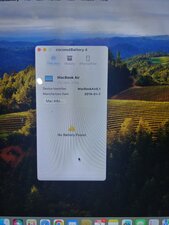
CoconutBattery main screen showing no battery detected.
Block Image
이 질문에 답하기 저도 같은 문제가 있습니다

좋은 질문입니까?

점수 0
댓글 달기

답변 2개

The laptop will go into a safe mode when no battery is detected, so go over the guide to ensure that all connections are seated correctly, it is most likely that the battery connection needs checking. If all is connected firmly and the battery is still not being detected then there could be an issue with the connector or the battery lines on the board, but hopefully it is just a simple reconnect the battery job as shown in steps 3 & 4.

MacBook Air 13" Retina Display 2019 배터리 교체

이 답변이 도움이 되었나요?

점수 0

댓글 2개:

I already opened the laptop back up and verified the battery connection. The original adhesive felt a bit dull. So verified the connection, and added fresh electrical tape to secure it. Still not recognized.

@nickwinter Then it can be any one of three issues, a damaged connector, a fault on the board on the battery data lines or a bad battery. Do you still have the old battery to test with? IF so that would eliminate the 1st 2 potential issues if it were detected.

댓글 달기

Before you open the system back up I would install a better tool to see what's going on.

Install this gem of an App CoconutBattery take a snapshot of the Apps main window and post it here so we too can see things. Make sure the charger is plugged in when you do this.

이 답변이 도움이 되었나요?

점수 0

댓글 5개:

If the battery isn't being recognized then how on earth is CB going to be able to provide any information?

@livfe - The SMC services should still be working! Which CoconutBattery is reporting from. Remember if the system is powered SMC is alive and it can give us clues on what happened.

Trying to download it now. The macbook is running at a snail's pace with the fan going full tilt. Took about 10min to get safari to open, get to the webpage and start the download. The download is going, but at this pace it will be done by tomorrow. Hopefully I can get it installed.

Added an edit to main post with the Coconut Battery screen. No battery detected.

@nickwinter - Let’s carefully disconnect the battery again and inspect the cable as well as it’s connectors pins as well as the sockets, do you see any out of place or damaged? If not plug the battery in again and make sure you press the connector fully in. You may need to rock it back and forth as it can be a bit tight and the pins need a bit of help aligning up. If you can take a picture of the connection so we can see it as well.

댓글 달기

답변을 추가하세요

Nick Winter 영원히 감사할 것입니다.
조회 통계:

지난 24시간: 17

지난 7일: 37

지난 30일: 37

전체 시간: 37
