주요 콘텐츠로 건너뛰기

AYL SoundFit Battery Replacement

필요한 것

  1. AYL SoundFit Battery Replacement, Battery: 1 단계, 이미지 1개 중 1개
    • Remove the four hex screws on the top of the device using a 2.5 hex screwdriver.

  2. AYL SoundFit Battery Replacement: 2 단계, 이미지 1개 중 1개
    • Place a spudger between the black plastic cover and the green case.

    • Pry the black cover away from the main casing and remove the cover.

  3. AYL SoundFit Battery Replacement: 3 단계, 이미지 1개 중 1개
    • Place a spudger between the black housing, which contains the woofer, and the outer rubber casing.

    • Pry the housing away from the body to reveal the motherboard, speaker, and battery.

  4. AYL SoundFit Battery Replacement: 4 단계, 이미지 2개 중 1개 AYL SoundFit Battery Replacement: 4 단계, 이미지 2개 중 2개
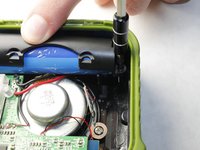
    • Remove the two Phillips #00 screws securing the battery casing.

    • Remove the battery case to reveal the battery.

  5. AYL SoundFit Battery Replacement: 5 단계, 이미지 1개 중 1개
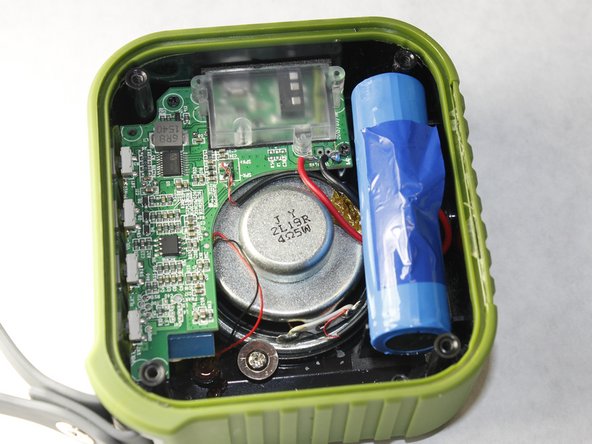
    • Desolder the positive and negative battery contacts from the motherboard.

    • Remove the battery from the device.

결론

To reassemble your device, follow these instructions in reverse order.

작성자

2다른 기여자 명과 함께

Dustin Moore

회원 가입일: 02/16/16

108 평판

안내서 1개를 작성함

IUPUI, Team 3-3, Harley Spring 2016 IUPUI, Team 3-3, Harley Spring 2016 회원

IUPUI-HARLEY-S16S3G3

4 회원들

안내서 5개를 작성함

4가이드 댓글

Which battery is this, and what is the mAH?

jlongsa - 답글

3.7V 1500mAh, 5.55Wh

Coba Farr -

The charger works but it does not say chargeing

Zaira Cortes - 답글

댓글 쓰기

조회 통계:

지난 24시간: 1

지난 7일: 4

지난 30일: 19

전체 시간: 3,054