주요 콘텐츠로 건너뛰기

Acer AL1916 EMI Shield Replacement

필요한 것

  1. Acer AL1916 EMI Shield Replacement, Stand: 1 단계, 이미지 1개 중 1개
    • Lay the monitor on a flat surface so that the back is facing up.

  2. Acer AL1916 EMI Shield Replacement: 2 단계, 이미지 2개 중 1개 Acer AL1916 EMI Shield Replacement: 2 단계, 이미지 2개 중 2개
    • Grab the hinge cover with both hands on either side of the stand.

    • Squeeze inwards with your thumbs and fingers and lift up to remove the hinge cover.

  3. Acer AL1916 EMI Shield Replacement: 3 단계, 이미지 2개 중 1개 Acer AL1916 EMI Shield Replacement: 3 단계, 이미지 2개 중 2개
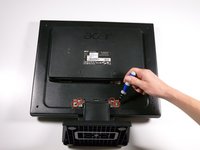
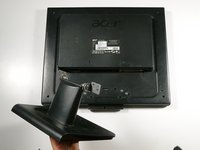
    • Remove the four 12.1 mm Phillips #2 screws that hold the stand to the monitor.

    • Support the monitor while removing the screws to prevent the monitor from falling.

    • Lift up to detach the stand.

  4. Acer AL1916 EMI Shield Replacement, Outer Case: 4 단계, 이미지 2개 중 1개 Acer AL1916 EMI Shield Replacement, Outer Case: 4 단계, 이미지 2개 중 2개
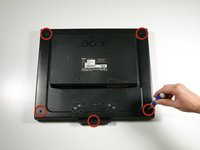
    • Remove the five 9.5 mm Phillips #2 screws located around the perimeter of the monitor.

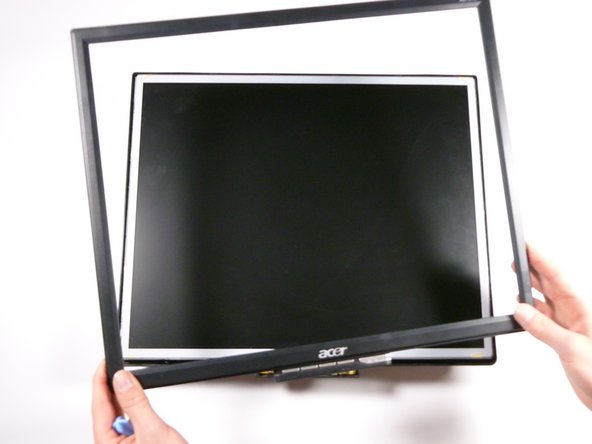
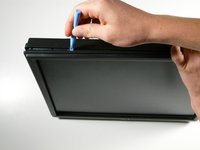
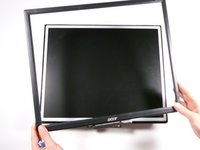
  5. Acer AL1916 EMI Shield Replacement: 5 단계, 이미지 3개 중 1개 Acer AL1916 EMI Shield Replacement: 5 단계, 이미지 3개 중 2개 Acer AL1916 EMI Shield Replacement: 5 단계, 이미지 3개 중 3개
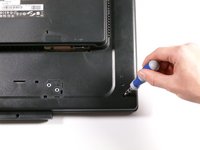
    • Starting at the corner of the monitor, wedge the small plastic opening tool between the back cover and the display bezel.

    • Tilt the plastic opening tool up to separate the back cover from the display bezel.

    • Continue around the perimeter of the monitor until the display bezel comes off.

    • A reasonable amount of force is necessary to detach the back cover from the display bezel.

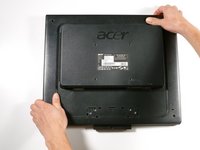
  6. Acer AL1916 EMI Shield Replacement: 6 단계, 이미지 2개 중 1개 Acer AL1916 EMI Shield Replacement: 6 단계, 이미지 2개 중 2개
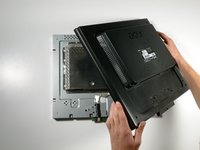
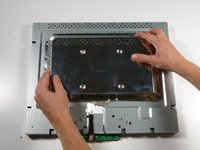
    • Reposition the monitor so that the back is facing up.

    • Grab the corners of the monitor and jiggle them upwards to detach the back cover from the inside of the monitor.

    • Lift the back cover up.

  7. Acer AL1916 EMI Shield Replacement, EMI Shield: 7 단계, 이미지 2개 중 1개 Acer AL1916 EMI Shield Replacement, EMI Shield: 7 단계, 이미지 2개 중 2개
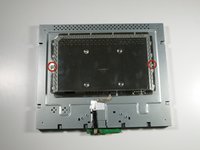
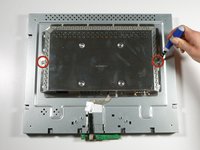
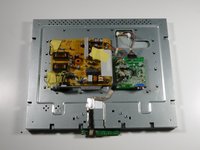
    • Remove the two 5.7 mm Phillips #2 screws located on either side of the EMI shield.

  8. Acer AL1916 EMI Shield Replacement: 8 단계, 이미지 2개 중 1개 Acer AL1916 EMI Shield Replacement: 8 단계, 이미지 2개 중 2개
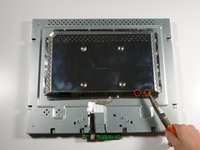
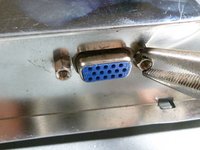
    • Using a nut driver (or if necessary, needle-nose pliers), remove the two nuts on either side of the VGA input.

  9. Acer AL1916 EMI Shield Replacement: 9 단계, 이미지 3개 중 1개 Acer AL1916 EMI Shield Replacement: 9 단계, 이미지 3개 중 2개 Acer AL1916 EMI Shield Replacement: 9 단계, 이미지 3개 중 3개
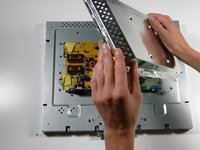
    • Grab the metal casing by the sides and slide it down towards the bottom of the monitor.

    • Lift up to remove the metal casing.

    • Beware, metal casing is sharp!

결론

To reassemble your device, follow these instructions in reverse order.

작성자

5다른 기여자 명과 함께

Taylor Atterbury

회원 가입일: 10/06/11

732 평판

안내서 3개를 작성함

Cal Poly, Team 20-26, Maness Fall 2011 Cal Poly, Team 20-26, Maness Fall 2011 회원

CPSU-MANESS-F11S20G26

4 회원들

안내서 14개를 작성함

0가이드 댓글

댓글 쓰기

조회 통계:

지난 24시간: 1

지난 7일: 2

지난 30일: 10

전체 시간: 1,427