주요 콘텐츠로 건너뛰기

Acer Aspire 5740-5780 Back Cover Replacement

필요한 것

  1. 주의: 1-4 단계들은 진행 중으로 표시된 안내서에서 제공되었습니다.

    Acer Aspire 5740-5780 Back Cover Replacement, Prepare Acer Aspire 5740-5780 for Disassembly: 1 단계, 이미지 2개 중 1개 Acer Aspire 5740-5780 Back Cover Replacement, Prepare Acer Aspire 5740-5780 for Disassembly: 1 단계, 이미지 2개 중 2개
    • Turn the laptop off and remove the power cord.

  2. Acer Aspire 5740-5780 Back Cover Replacement: 2 단계, 이미지 2개 중 1개 Acer Aspire 5740-5780 Back Cover Replacement: 2 단계, 이미지 2개 중 2개
    • Press in the SD Card or the SD Card Dummy if no SD Card is there. Remove card when it pops out.

  3. Acer Aspire 5740-5780 Back Cover Replacement: 3 단계, 이미지 1개 중 1개
    • Flip the laptop over on its face, so that the back is showing.

  4. Acer Aspire 5740-5780 Back Cover Replacement: 4 단계, 이미지 1개 중 1개
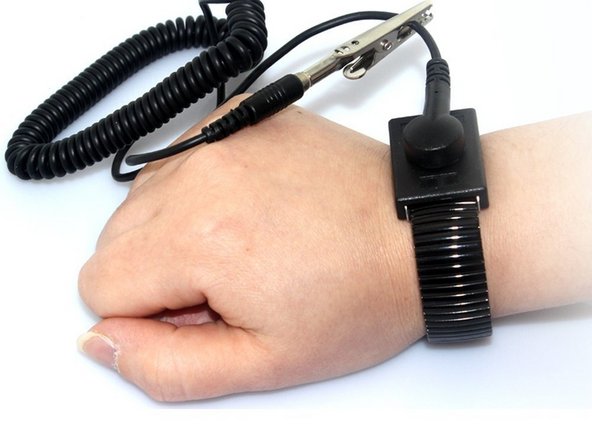
    • Put grounding strap on one of your wrists and attach the other end to a large metal object (recommended method).

    • If you don't have a grounding strap an alternative approach is to touch a metal object that is either large or connected to the earth. Then avoid doing things that would accumulate static electricity on your body.

    • Touching the internals of your device while you aren't grounded could destroy your laptop.

  5. Acer Aspire 5740-5780 Back Cover Replacement, Battery: 5 단계, 이미지 2개 중 1개 Acer Aspire 5740-5780 Back Cover Replacement, Battery: 5 단계, 이미지 2개 중 2개
    • Unlock the battery by flipping a switch near the release latch.

  6. Acer Aspire 5740-5780 Back Cover Replacement: 6 단계, 이미지 1개 중 1개
    • Slide the release latch to the left to release the battery from the PC.

  7. Acer Aspire 5740-5780 Back Cover Replacement: 7 단계, 이미지 2개 중 1개 Acer Aspire 5740-5780 Back Cover Replacement: 7 단계, 이미지 2개 중 2개
    • Use your hands to pry the battery free of the computer.

  8. Acer Aspire 5740-5780 Back Cover Replacement, Back Cover: 8 단계, 이미지 2개 중 1개 Acer Aspire 5740-5780 Back Cover Replacement, Back Cover: 8 단계, 이미지 2개 중 2개
    • Unscrew the 2 captive screws and 3 M2.5 x L8 screws holding back cover in place.

  9. Acer Aspire 5740-5780 Back Cover Replacement: 9 단계, 이미지 2개 중 1개 Acer Aspire 5740-5780 Back Cover Replacement: 9 단계, 이미지 2개 중 2개
    • Use spudger to pry open the back panel.

    • Then lift panel off of the computer.

결론

To reassemble your device, follow these instructions in reverse order.

작성자

3다른 기여자 명과 함께

Dwyer Deighan

회원 가입일: 03/25/18

358 평판

안내서 3개를 작성함

UMass Dartmouth, Team S3-G6, Peak Spring 2018 UMass Dartmouth, Team S3-G6, Peak Spring 2018 회원

UMASSD-PEAK-S18S3G6

3 회원들

안내서 9개를 작성함

0가이드 댓글

댓글 쓰기

조회 통계:

지난 24시간: 2

지난 7일: 4

지난 30일: 7

전체 시간: 885