소개
The Acer Aspire 5741-5698 is an aging laptop that struggles to compete with newer standards. For that reason, replacing the factory RAM chip with something with a bit more power is a good course of action.
필요한 것
-
-
-
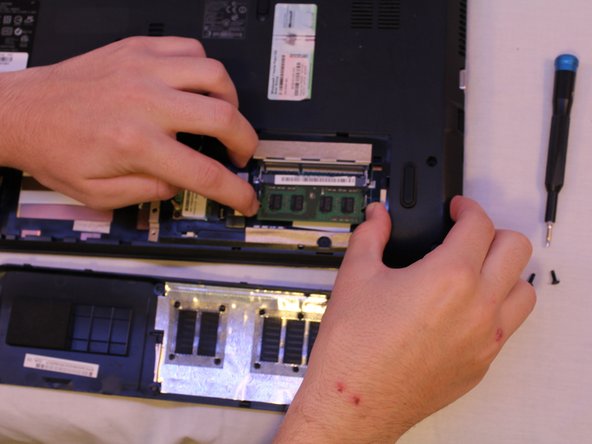
Depress the two prongs holding the chip in and remove the chip.
-
Slide in a new chip, seating it so that it clicks and locks into position.
-


 FixBot에 문의하기



To reassemble your device, follow these instructions in reverse order.
다른 2명이 해당 안내서를 완성하였습니다.

팀

Cal Poly, Team S18-G6, White Winter 2019 Cal Poly, Team S18-G6, White Winter 2019 회원
CPSU-WHITE-W19S18G6
4 회원들
안내서 5개를 작성함
1가이드 댓글
No meu caso e ICER aspire 5741 que está com a tela preta e já fiz todos esses procedimentos que vcs mostram, mas não resolveu. Ele liga, pedi a senha, manda aguardar, mas fica com a tela preta. Não aparece nada na tela
