주요 콘텐츠로 건너뛰기

Acer Aspire V5-572 Cooling / Fan System Replacement

필요한 것

  1. Acer Aspire V5-572 Cooling / Fan System Replacement, Bottom Cover: 1 단계, 이미지 1개 중 1개
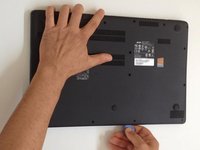
    • Switch-off the Laptop.

    • Remove the seventeen Philips #0 screws.

  2. Acer Aspire V5-572 Cooling / Fan System Replacement: 2 단계, 이미지 1개 중 1개
    • If there is a plastic storage tray in the laptop, remove it.

  3. Acer Aspire V5-572 Cooling / Fan System Replacement: 3 단계, 이미지 3개 중 1개 Acer Aspire V5-572 Cooling / Fan System Replacement: 3 단계, 이미지 3개 중 2개 Acer Aspire V5-572 Cooling / Fan System Replacement: 3 단계, 이미지 3개 중 3개
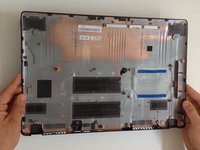
    • Starting from the SD Memory Card hole, start prying between the top and bottom cases.

    • Use plastic tools to avoid damaging the cover.

    • Remove the bottom case.

  4. Acer Aspire V5-572 Cooling / Fan System Replacement: 4 단계, 이미지 1개 중 1개
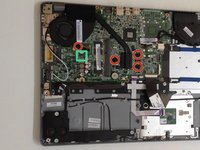
    • Disconnect the battery immediately for a safer repair.

    • Pull the battery connector away from the hard drive to disconnect it.

  5. Acer Aspire V5-572 Cooling / Fan System Replacement, Cooling / Fan System: 5 단계, 이미지 2개 중 1개 Acer Aspire V5-572 Cooling / Fan System Replacement, Cooling / Fan System: 5 단계, 이미지 2개 중 2개
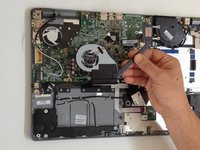
    • Disconnect the Fan cable.

    • Remove the three screws from the CPU cooler and one from the Fan module.

    • When you change the Cooling system, you must clean the processor from old thermal compound and put new.

결론

To reassemble your device, follow these instructions in reverse order.

다른 2명이 해당 안내서를 완성하였습니다.

작성자

3다른 기여자 명과 함께

ZFix

회원 가입일: 12/09/13

195,943 평판

안내서 330개를 작성함

Master Techs Master Techs 회원

Community

329 회원들

안내서 1,452개를 작성함

0가이드 댓글

댓글 쓰기

조회 통계:

지난 24시간: 0

지난 7일: 2

지난 30일: 7

전체 시간: 2,895