소개
This is a fairly easy repair and only requires a Phillips #0 screwdriver and a plastic spudger. Before beginning this repair, make sure to completely power down your computer as it is dangerous to work on the internals of the computer while it is running. Also, remember to handle all of the internal components of your Chromebook with care as they are fragile.
필요한 것
-
-
-
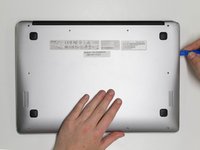
Insert a plastic opening tool into the crack between the bottom panel and the side of the computer.
-
Gently pry the panel off the computer by continuously pulling up and on the panel and moving the plastic opening tool around the crack until the panel comes off.
-
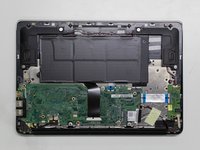
Remove the bottom panel and set it aside.
-


To reassemble your device, follow these instructions in reverse order.



팀

Cal Poly, Team S17-G3, Banghart Spring 2017 Cal Poly, Team S17-G3, Banghart Spring 2017 회원
CPSU-BANGHART-S17S17G3
5 회원들
안내서 10개를 작성함
