주요 콘텐츠로 건너뛰기

Acer Chromebook Spin 511 (C741L) N20Q8 Display Assembly Replacement

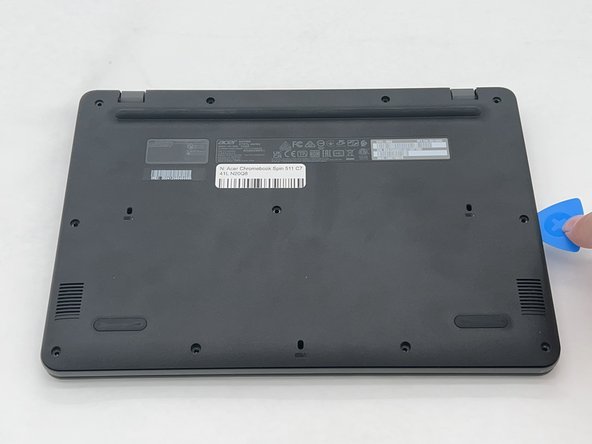
필요한 것

  1. Acer Chromebook Spin 511 (C741L) N20Q8 Display Assembly Replacement, Back Cover: 1 단계, 이미지 2개 중 1개 Acer Chromebook Spin 511 (C741L) N20Q8 Display Assembly Replacement, Back Cover: 1 단계, 이미지 2개 중 2개
    • Remove the eleven 2.4 mm screws securing the back plate and internals of the Chromebook using a Phillips #1 screwdriver.

  2. Acer Chromebook Spin 511 (C741L) N20Q8 Display Assembly Replacement: 2 단계, 이미지 2개 중 1개 Acer Chromebook Spin 511 (C741L) N20Q8 Display Assembly Replacement: 2 단계, 이미지 2개 중 2개
    • Use an opening pick to remove the backplate of the laptop revealing the internals of the Chromebook.

  3. Acer Chromebook Spin 511 (C741L) N20Q8 Display Assembly Replacement, Display Assembly: 3 단계, 이미지 2개 중 1개 Acer Chromebook Spin 511 (C741L) N20Q8 Display Assembly Replacement, Display Assembly: 3 단계, 이미지 2개 중 2개
    • Remove the six 2.4 mm screws from the hinges using a Phillips #1 screwdriver.

  4. Acer Chromebook Spin 511 (C741L) N20Q8 Display Assembly Replacement: 4 단계, 이미지 1개 중 1개
    • Flip up the hinges on each side that were previously secured down by the screws.

  5. Acer Chromebook Spin 511 (C741L) N20Q8 Display Assembly Replacement: 5 단계, 이미지 2개 중 1개 Acer Chromebook Spin 511 (C741L) N20Q8 Display Assembly Replacement: 5 단계, 이미지 2개 중 2개
    • Carefully detach the blue, yellow, and black wires from their connectors.

  6. Acer Chromebook Spin 511 (C741L) N20Q8 Display Assembly Replacement: 6 단계, 이미지 2개 중 1개 Acer Chromebook Spin 511 (C741L) N20Q8 Display Assembly Replacement: 6 단계, 이미지 2개 중 2개
    • Remove the electrical tape from the black connector and gently remove it from the socket.

  7. Acer Chromebook Spin 511 (C741L) N20Q8 Display Assembly Replacement: 7 단계, 이미지 2개 중 1개 Acer Chromebook Spin 511 (C741L) N20Q8 Display Assembly Replacement: 7 단계, 이미지 2개 중 2개
    • The base and display assembly are now able to be separated. Simply pull and remove the display assembly from the base of the laptop.

결론

To reassemble your device, follow these instructions in reverse order.

다른 2명이 해당 안내서를 완성하였습니다.

작성자

2다른 기여자 명과 함께

Lauryn F

회원 가입일: 09/26/24

722 평판

안내서 5개를 작성함

0가이드 댓글

댓글 쓰기

조회 통계:

지난 24시간: 0

지난 7일: 4

지난 30일: 16

전체 시간: 240