주요 콘텐츠로 건너뛰기

Acer Chromebook cb3-532-c47c Disconnect Speakers Prerequisite

단지 전제 조건
이 가이드는 전제 조건 전용 가이드입니다! 이 가이드는 다른 절차의 일부이며 단독으로 사용할 수 없습니다.

필요한 것

  1. Acer Chromebook cb3-532-c47c Disconnect Speakers Prerequisite, Back Panel: 1 단계, 이미지 2개 중 1개 Acer Chromebook cb3-532-c47c Disconnect Speakers Prerequisite, Back Panel: 1 단계, 이미지 2개 중 2개
    • Power off the laptop before beginning the replacement.

    • Using the Phillips #1 screwdriver, remove eighteen 7 mm screws from the back panel of the device.

  2. Acer Chromebook cb3-532-c47c Disconnect Speakers Prerequisite: 2 단계, 이미지 2개 중 1개 Acer Chromebook cb3-532-c47c Disconnect Speakers Prerequisite: 2 단계, 이미지 2개 중 2개
    • Use a plastic opening tool around the edges of the laptop and remove the back panel from the device.

  3. Acer Chromebook cb3-532-c47c Disconnect Speakers Prerequisite, Remove the battery cable: 3 단계, 이미지 1개 중 1개
    • Push on the sides of the connector with a plastic spudger to separate the cable from the motherboard.

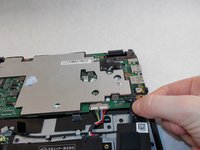
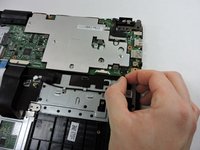
  4. Acer Chromebook cb3-532-c47c Disconnect Speakers Prerequisite, Disconnect the Speakers: 4 단계, 이미지 2개 중 1개 Acer Chromebook cb3-532-c47c Disconnect Speakers Prerequisite, Disconnect the Speakers: 4 단계, 이미지 2개 중 2개
    • Pull the black ribbon attached to the speakers out of the motherboard.

결론

To reassemble your device, follow these instructions in reverse order.

작성자

2다른 기여자 명과 함께

Jerry Wheeler

회원 가입일: 03/21/22

83,995 평판

안내서 74개를 작성함

0가이드 댓글

댓글 쓰기

조회 통계:

지난 24시간: 0

지난 7일: 0

지난 30일: 0

전체 시간: 46