주요 콘텐츠로 건너뛰기

Acer Spin 5 SP513-51-57TP CMOS Battery Replacement

필요한 것

  1. Acer Spin 5 SP513-51-57TP CMOS Battery Replacement, Battery: 1 단계, 이미지 1개 중 1개
    • Flip your laptop over so that the model sticker is facing upward towards the ceiling.

    • Make sure your computer is turned off before starting to avoid getting shocked.

  2. Acer Spin 5 SP513-51-57TP CMOS Battery Replacement: 2 단계, 이미지 2개 중 1개 Acer Spin 5 SP513-51-57TP CMOS Battery Replacement: 2 단계, 이미지 2개 중 2개
    • Use a Phillips #1 screwdriver to remove the thirteen 6.5mm screws that secure the back cover.

  3. Acer Spin 5 SP513-51-57TP CMOS Battery Replacement: 3 단계, 이미지 3개 중 1개 Acer Spin 5 SP513-51-57TP CMOS Battery Replacement: 3 단계, 이미지 3개 중 2개 Acer Spin 5 SP513-51-57TP CMOS Battery Replacement: 3 단계, 이미지 3개 중 3개
    • Use a plastic opening tool to gently separate the back cover from the laptop. A snapping sound will be heard as a signal that the clips are being disengaged.

    • Do not use any metal tools to pry open the device.

    • It is recommended that you start from one corner and run the tool along the edges of your laptop from corner to corner for a safe removal.

  4. Acer Spin 5 SP513-51-57TP CMOS Battery Replacement: 4 단계, 이미지 3개 중 1개 Acer Spin 5 SP513-51-57TP CMOS Battery Replacement: 4 단계, 이미지 3개 중 2개 Acer Spin 5 SP513-51-57TP CMOS Battery Replacement: 4 단계, 이미지 3개 중 3개
    • Use a Phillips #1 screwdriver to remove two 4 mm screws that secure the battery.

  5. Acer Spin 5 SP513-51-57TP CMOS Battery Replacement: 5 단계, 이미지 3개 중 1개 Acer Spin 5 SP513-51-57TP CMOS Battery Replacement: 5 단계, 이미지 3개 중 2개 Acer Spin 5 SP513-51-57TP CMOS Battery Replacement: 5 단계, 이미지 3개 중 3개
    • Use your hand to carefully pull out the wiring harness from its port that is located between the battery and the motherboard.

    • Remove the battery from the case.

  6. Acer Spin 5 SP513-51-57TP CMOS Battery Replacement, CMOS Battery: 6 단계, 이미지 3개 중 1개 Acer Spin 5 SP513-51-57TP CMOS Battery Replacement, CMOS Battery: 6 단계, 이미지 3개 중 2개 Acer Spin 5 SP513-51-57TP CMOS Battery Replacement, CMOS Battery: 6 단계, 이미지 3개 중 3개
    이 단계에 사용된 도구:
    Tweezers
    $4.99
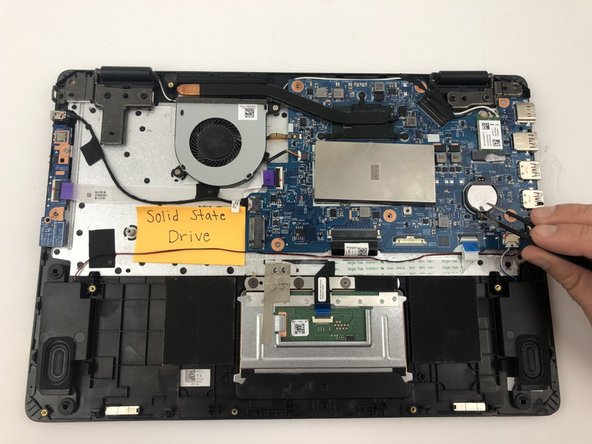
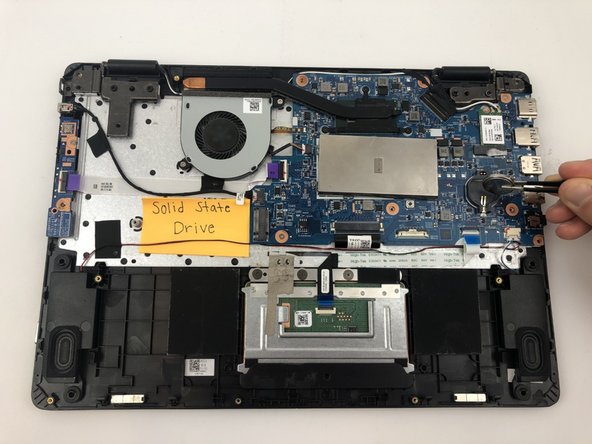
    • Grasp the CMOS battery with the tweezers and remove it from the motherboard.

결론

To reassemble your device, follow these instructions in reverse order.

다른 한 분이 해당 안내서를 완성하였습니다.

작성자

4다른 기여자 명과 함께

Anthony Vansell

회원 가입일: 01/24/20

910 평판

안내서 5개를 작성함

Hufflepuff Hufflepuff 회원

Local Repair Groups

3 회원들

안내서 9개를 작성함

0가이드 댓글

댓글 쓰기

조회 통계:

지난 24시간: 0

지난 7일: 3

지난 30일: 17

전체 시간: 1,159