주요 콘텐츠로 건너뛰기

Analogue Pocket Battery Shell Replacement

필요한 것

  1. Analogue Pocket Battery Shell Replacement, Prepare your device for disassembly: 1 단계, 이미지 3개 중 1개 Analogue Pocket Battery Shell Replacement, Prepare your device for disassembly: 1 단계, 이미지 3개 중 2개 Analogue Pocket Battery Shell Replacement, Prepare your device for disassembly: 1 단계, 이미지 3개 중 3개
    • Unplug all cables and fully power off your device.

    • Working on your device requires laying it screen-side down. To prevent damage, lay it on a soft surface such as a towel.

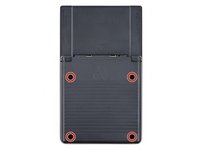
  2. Analogue Pocket Battery Shell Replacement, Unfasten the battery shell: 2 단계, 이미지 2개 중 1개 Analogue Pocket Battery Shell Replacement, Unfasten the battery shell: 2 단계, 이미지 2개 중 2개
    • Use a T6 Torx screwdriver to remove the four 13.4 mm‑long screws securing the battery shell.

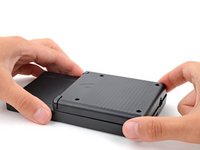
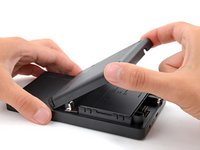
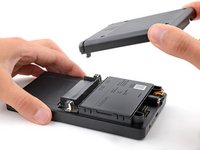
  3. Analogue Pocket Battery Shell Replacement, Remove the battery shell: 3 단계, 이미지 3개 중 1개 Analogue Pocket Battery Shell Replacement, Remove the battery shell: 3 단계, 이미지 3개 중 2개 Analogue Pocket Battery Shell Replacement, Remove the battery shell: 3 단계, 이미지 3개 중 3개
결론

To reassemble your device, follow these instructions in reverse order.

작성자

1다른 기여자 명과 함께

Spencer Day

회원 가입일: 09/14/22

149,751 평판

안내서 995개를 작성함

iFixit iFixit 회원

Staff

123 회원들

안내서 23,629개를 작성함

0가이드 댓글

댓글 쓰기

조회 통계:

지난 24시간: 0

지난 7일: 1

지난 30일: 10

전체 시간: 480