주요 콘텐츠로 건너뛰기

Apple AirPort Extreme Model A1034 Internet Card Replacement

필요한 것

  1. Apple AirPort Extreme Model A1034 Internet Card Replacement, Outer Case: 1 단계, 이미지 1개 중 1개
    • Remove the three 14.3mm T7 Torx screws from the bottom of AirPort.

  2. Apple AirPort Extreme Model A1034 Internet Card Replacement: 2 단계, 이미지 1개 중 1개
    • Remove the 5.1mm Phillips screw from the bottom of the AirPort. This screw is located under the identification sticker. You will have to remove the sticker or make a hole to remove it.

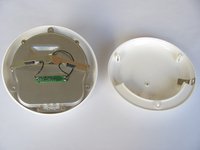
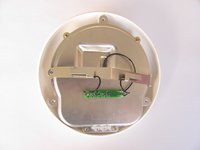
  3. Apple AirPort Extreme Model A1034 Internet Card Replacement: 3 단계, 이미지 2개 중 1개 Apple AirPort Extreme Model A1034 Internet Card Replacement: 3 단계, 이미지 2개 중 2개
    • Lift the bottom and top casing straight apart and then lift metal casing straight up from the bottom plastic casing.

  4. Apple AirPort Extreme Model A1034 Internet Card Replacement: 4 단계, 이미지 1개 중 1개
    • Unplug the black connector on the top of the metal casing by gently pulling horizontally.

  5. Apple AirPort Extreme Model A1034 Internet Card Replacement, Internet Card: 5 단계, 이미지 1개 중 1개
    • Remove four 1mm phillips screws from the bottom.

  6. Apple AirPort Extreme Model A1034 Internet Card Replacement: 6 단계, 이미지 1개 중 1개
    • Separate the top and bottom of the metal casing. You will now expose the motherboard and AirPort card.

    • To remove the AirPort card, gently pull the plastic tab horizontally.

결론

To reassemble your device, follow these instructions in reverse order.

다른 3명이 해당 안내서를 완성하였습니다.

작성자

5다른 기여자 명과 함께

Michael Garcia

회원 가입일: 10/12/11

411 평판

안내서 5개를 작성함

Cal Poly, Team 17-15, Regan Fall 2011 Cal Poly, Team 17-15, Regan Fall 2011 회원

CPSU-REGAN-F11S17G15

3 회원들

안내서 13개를 작성함

1가이드 댓글

Thank you so much for your guide! I was challenging myself to do it without cheating, but couldn't figure out how to release the bottom plastic layer from the main unit inside after I undid the 3 Torx screws. Thankfully you avoided me having to break the whole unit by showing where the central screw hidden beneath the S/N 3 barcode sticker was and that it was Philips not Torx, and I can now pinch the A1027 wifi card and use it in my G5, instead of relying on ageing ethernet! Bless you kind folks!

HumptyDumpty - 답글

댓글 쓰기

조회 통계:

지난 24시간: 0

지난 7일: 5

지난 30일: 10

전체 시간: 5,349
