주요 콘텐츠로 건너뛰기

Asus Q524U Battery Replacement

필요한 것

  1. Asus Q524U Battery Replacement, Back Panel: 1 단계, 이미지 2개 중 1개 Asus Q524U Battery Replacement, Back Panel: 1 단계, 이미지 2개 중 2개
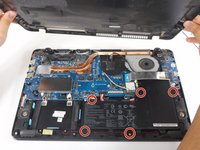
    • Remove ten 3 mm screws using a Phillips #0 screwdriver.

  2. Asus Q524U Battery Replacement: 2 단계, 이미지 1개 중 1개
    • Lift up the back panel and set it to the side.

  3. Asus Q524U Battery Replacement, Battery: 3 단계, 이미지 2개 중 1개 Asus Q524U Battery Replacement, Battery: 3 단계, 이미지 2개 중 2개
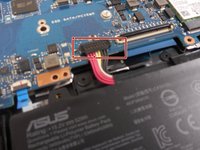
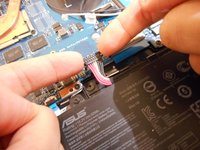
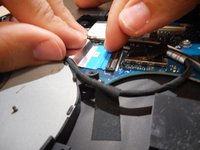
    • Using your fingers, grip onto both sides of the wire harness and push it upwards.

  4. Asus Q524U Battery Replacement: 4 단계, 이미지 2개 중 1개 Asus Q524U Battery Replacement: 4 단계, 이미지 2개 중 2개
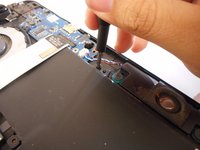
    • Remove the five 3 mm screws holding the battery in place using a Phillips #0 screwdriver.

  5. Asus Q524U Battery Replacement: 5 단계, 이미지 3개 중 1개 Asus Q524U Battery Replacement: 5 단계, 이미지 3개 중 2개 Asus Q524U Battery Replacement: 5 단계, 이미지 3개 중 3개
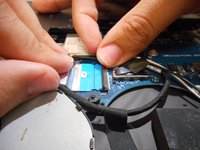
    • Tilt the small black tab up which will allow the blue tape to be slid out.

  6. Asus Q524U Battery Replacement: 6 단계, 이미지 1개 중 1개
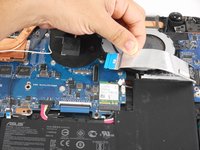
    • Simply lift the battery up and out of its holding area.

결론

To reassemble your device, follow these instructions in reverse order.

작성자

1다른 기여자 명과 함께

Leonardo Pena

회원 가입일: 03/08/23

439 평판

안내서 4개를 작성함

0가이드 댓글

댓글 쓰기

조회 통계:

지난 24시간: 0

지난 7일: 0

지난 30일: 17

전체 시간: 576