주요 콘텐츠로 건너뛰기
수리 커뮤니티 가입 - 계정 만들기

Asus Vivobook Max X541SA-PD0703X Battery Replacement

조회수: 6.1천

통계 보기:

지난 24시간
2
지난 7일:
18
지난 30일:
77
전체 시간:
6,057
댓글: 7

3 comments on steps, 4 guide comments.

Go to guide comments
완료함: 3

3명이 이 안내서를 "완료"로 표시했습니다. 다음은 귀하의 차례입니까?

즐겨찾기: 0

해당 안내서에 좋아요를 누르고 구독한 사람이 아직 없습니다. 첫 번째 주인공이 되시겠습니까?

소요 시간: 25 - 45 분
난이도: 조정
Asus Vivobook Max X541SA-PD0703X Battery Replacement

A battery is an essential part of the laptop which is needed in order to power on and use the computer. This guide will show you how to replace the battery of your Asus Vivobook Max X541SA-PD0703X. In order to replace the battery, you will have to remove the hard drive, motherboard, wifi card, and disc drive insert.

필요한 것

부품

도구

    1. Asus Vivobook Max X541SA-PD0703X Battery Replacement, Hard Drive: 1 단계, 이미지 1개 중 1개
      • Flip the laptop upside down so that the back of the laptop faces you.

      댓글 쓰기

    2. Asus Vivobook Max X541SA-PD0703X Battery Replacement: 2 단계, 이미지 1개 중 1개
      • Remove the following ten Phillips #0 screws from the bottom of the laptop:

      • Six 13mm screws.

      • Four 11mm screws.

      댓글 쓰기

    3. Asus Vivobook Max X541SA-PD0703X Battery Replacement: 3 단계, 이미지 3개 중 1개 Asus Vivobook Max X541SA-PD0703X Battery Replacement: 3 단계, 이미지 3개 중 2개 Asus Vivobook Max X541SA-PD0703X Battery Replacement: 3 단계, 이미지 3개 중 3개
      • Using a plastic opening tool, pry up the palm rest from the bottom case of the laptop.

      • Don't completely remove as there are ribbon cables connecting the two halves.

      댓글 쓰기

    4. Asus Vivobook Max X541SA-PD0703X Battery Replacement: 4 단계, 이미지 3개 중 1개 Asus Vivobook Max X541SA-PD0703X Battery Replacement: 4 단계, 이미지 3개 중 2개 Asus Vivobook Max X541SA-PD0703X Battery Replacement: 4 단계, 이미지 3개 중 3개
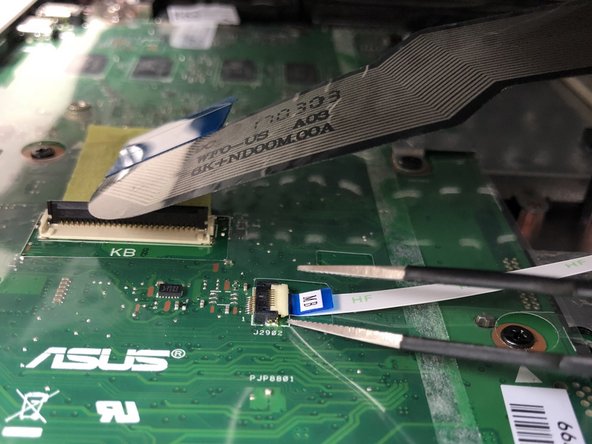
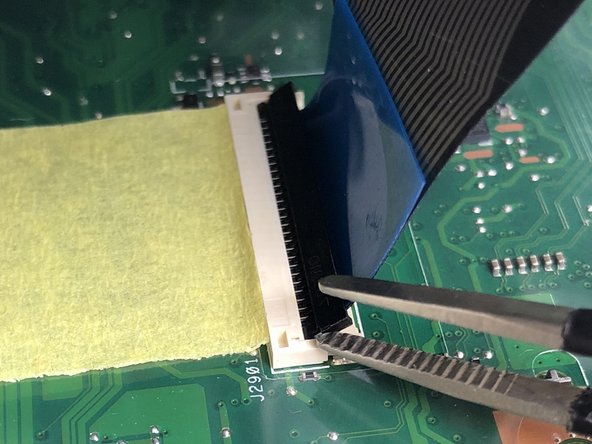
      • Use a spudger to flip up the retaining flaps on both keyboard ribbon cable ZIF sockets.

      • Pull the ribbon cables out of their sockets.

      댓글 쓰기

    5. Asus Vivobook Max X541SA-PD0703X Battery Replacement: 5 단계, 이미지 1개 중 1개
      • Remove the three 6mm Phillips #0 screws from the motherboard.

      댓글 쓰기

    6. Asus Vivobook Max X541SA-PD0703X Battery Replacement: 6 단계, 이미지 2개 중 1개 Asus Vivobook Max X541SA-PD0703X Battery Replacement: 6 단계, 이미지 2개 중 2개
      • Pull the Wi-Fi card out of the motherboard.

      댓글 쓰기

    7. Asus Vivobook Max X541SA-PD0703X Battery Replacement: 7 단계, 이미지 1개 중 1개
      • Remove the hard drive by pulling it towards the right, and removing it from the laptop case

      댓글 쓰기

    1. Asus Vivobook Max X541SA-PD0703X Battery Replacement, Disc Drive: 8 단계, 이미지 1개 중 1개
      • Remove the disc drive by sliding it towards the right and removing it from the laptop case

      댓글 쓰기

    1. Asus Vivobook Max X541SA-PD0703X Battery Replacement, Motherboard: 9 단계, 이미지 2개 중 1개 Asus Vivobook Max X541SA-PD0703X Battery Replacement, Motherboard: 9 단계, 이미지 2개 중 2개
      • Remove the three 6mm Phillips #0 screws from the fan shroud.

      • Remove the shroud from the motherboard.

      댓글 쓰기

    2. Asus Vivobook Max X541SA-PD0703X Battery Replacement: 10 단계, 이미지 1개 중 1개
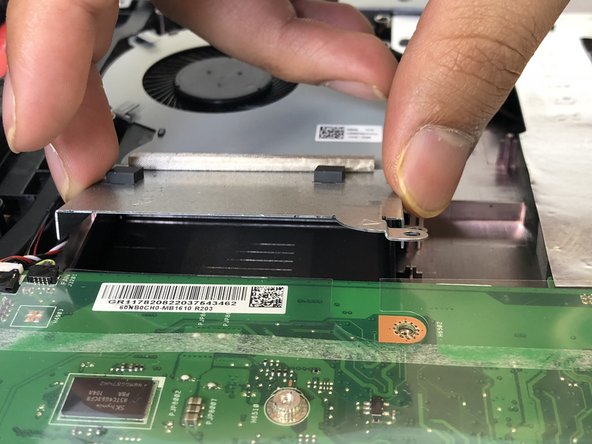
      • Pull the metal casing to the right.

      • Be careful when pulling the case because it may break the motherboard.

      댓글 쓰기

    3. Asus Vivobook Max X541SA-PD0703X Battery Replacement: 11 단계, 이미지 2개 중 1개 Asus Vivobook Max X541SA-PD0703X Battery Replacement: 11 단계, 이미지 2개 중 2개
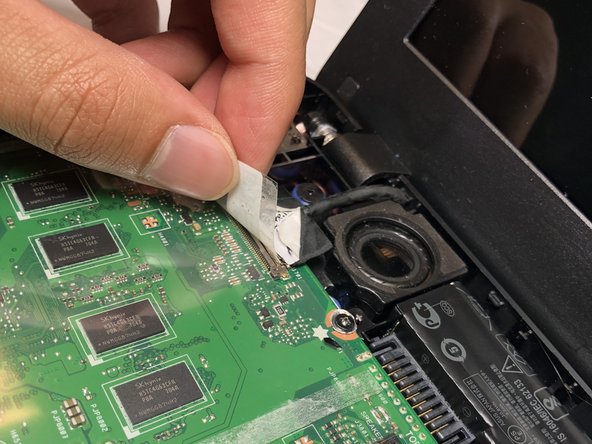
      • There is a wire attached to the screen display.

      • Peel the sticker and disconnect it from the motherboard.

      댓글 쓰기

    4. Asus Vivobook Max X541SA-PD0703X Battery Replacement: 12 단계, 이미지 1개 중 1개
      • Remove the plastic covering off of the motherboard.

      댓글 쓰기

    5. Asus Vivobook Max X541SA-PD0703X Battery Replacement: 13 단계, 이미지 1개 중 1개
      • Remove the five 6mm Phillips #0 screws from the motherboard.

      댓글 쓰기

    6. Asus Vivobook Max X541SA-PD0703X Battery Replacement: 14 단계, 이미지 2개 중 1개 Asus Vivobook Max X541SA-PD0703X Battery Replacement: 14 단계, 이미지 2개 중 2개
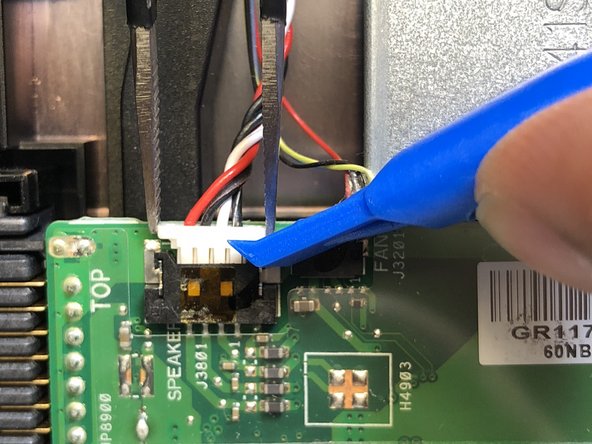
      • Remove the cables connected to the motherboard by unplugging them using a plastic opening tool, or by hand.

      댓글 쓰기

    7. Asus Vivobook Max X541SA-PD0703X Battery Replacement: 15 단계, 이미지 1개 중 1개
      • Pull the motherboard to the right and lift up.

      댓글 쓰기

    1. Asus Vivobook Max X541SA-PD0703X Battery Replacement, Battery: 16 단계, 이미지 1개 중 1개
      • Remove the 6mm Phillips #0 screw from the battery bracket.

      댓글 쓰기

    2. Asus Vivobook Max X541SA-PD0703X Battery Replacement: 17 단계, 이미지 1개 중 1개
      • Use a plastic opening tool to remove the battery from the laptop.

      댓글 쓰기

결론

To reassemble your device, follow these instructions in reverse order.

취소: 해당 안내서를 완성하지 않았습니다.

다른 3명이 해당 안내서를 완성하였습니다.

작성자

3다른 기여자 명과 함께

Hetvi Mehta

회원 가입일: 02/22/18

820 평판

안내서 5개를 작성함

팀

USF Tampa, Team S1-G4, Cagle Spring 2018 USF Tampa, Team S1-G4, Cagle Spring 2018 회원

USFT-CAGLE-S18S1G4

4 회원들

안내서 84개를 작성함

4가이드 댓글

Finished so simple, guide was easy to follow. Thank you

Forever R Holdings - 답글 공유

Who was the idiot who designed this laptop? Remove the motherboard to replace the battery? Unbelievable.

Greg Worrel - 답글 공유

I have a dead cmos battery and it seems i need to replace the whole battery

Wint3r xxx - 답글 공유

Sir how do I replace my cmos battery? Is it integrated with the battery. I also have Asus Vivobook Max X541SA-PD0703X

Wint3r xxx - 답글 공유

댓글 쓰기

조회 통계:

지난 24시간: 2

지난 7일: 18

지난 30일: 77

전체 시간: 6,057