소개
Atomic clocks are wonderful until the battery runs down, the original instructions are lost, and the proper sequence of steps to set time, and time zone are forgotten. This Guide and future contributed steps will help you with some of these clocks. The current list of clocks:
La Crosse Model WT-3101, ...
-
-
Start with a fresh alkaline AA battery
-
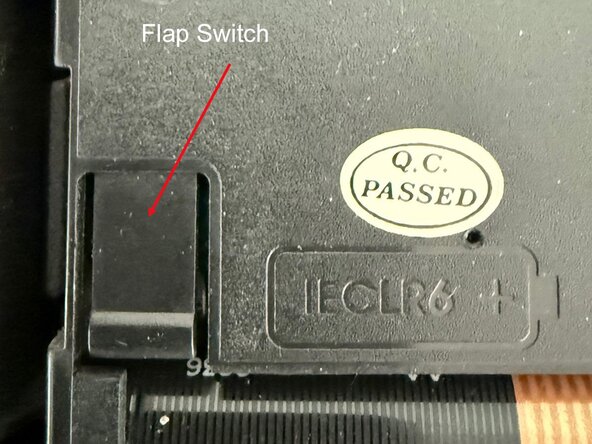
Remove the battery for 15 seconds then reinsert, battery button-top towards the + sign.
-
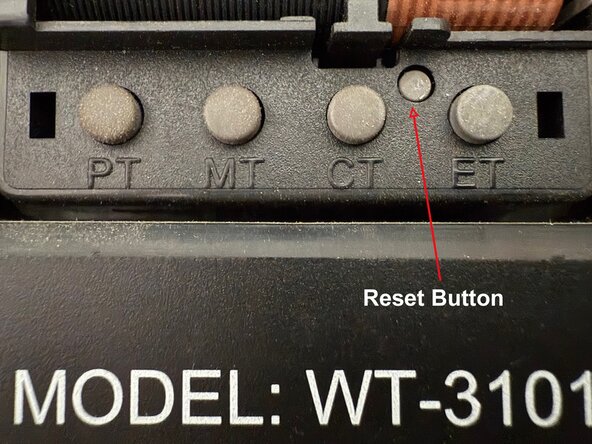
Press and release the button for the desired time zone, e.g. ET = Eastern Standard Time. (the radio signal takes care of the daylight saving time adjustment).
-
Using the straight end of an unfolded paper clip, press in the reset button till it clicks and then release.
-
The hands should all move to 12:00 o'clock and stop, waiting for the radio signal from WWVB in Boulder, Colorado. This may take all night, as the reception is much better after dark.
-
For best reception, the plane of the clock should be aligned with the direction to Boulder, Colorado and the placement should be at a window, the higher the better.
-
The Flap switch was not needed for this setting.
-
-
That should do it. If you are in the EST zone, for example, and the time is 1 to 4 hr prior to the current time, try pressing the ET button again and then the reset button. Sometimes the button contacts get worn in certain places. Please let me know in the comments if you find errors or need further help.



