소개
Use this guide to replace any piece inside your BLU Vivo 5 Mini.
This guide instructs you to remove the back panel encasing; with the purpose to remove internal items such as battery, camera, speaker, charging port etc.
For better performance and a longer lasting charge: Drain battery below 10% , and then proceed to charge it without interruptions to 100%.
필요한 것
-
이 단계에 사용된 도구:Tweezers$4.99
-
Remove the 2 screws along the bottom on either side of the speaker port with the size 2 Pentalobe driver.
-
After screws are removed, dislodge the speaker and charger port cover from device using the tweezers.
 FixBot에 문의하기
-
-
-
Remove the top and bottom covers.
-
Start by sliding the pick around the edges of both covers. (If you have the glue adhesive removal tool use that instead of pick, as it creates less damage.)
-
After freeing the edges gentle start peeling the covers off.
-
-
-
-
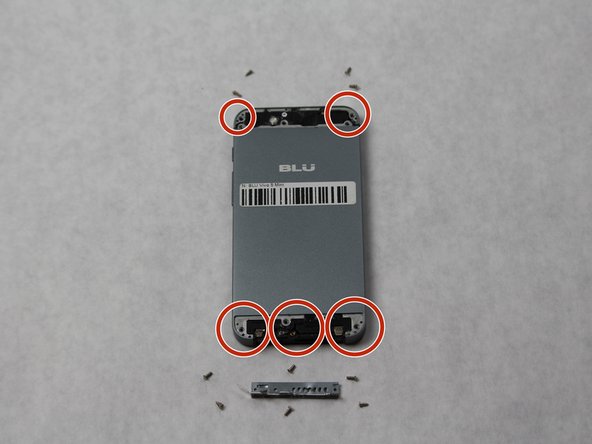
Using a Phillips #000, remove all 10 screws found on the back of the phone.
-
The 6 on the bottom are to be removed with a size PH000 Phillips Head screwdriver.
-
The 4 on the top can be removed with the same screwdriver.
-
-
-
Completely remove SIM card port from side of phone using the SIM Card Eject Tool.
-
Release the back cover (it may be glued down encasing the phone) using the suction device to lift the back off.
-
Begin inserting the pick sliding it between the back of the phone and the cover to completely remove back cover, if suction does not lift.
-




To reassemble your device, follow these instructions in reverse order.
You can also use steps 1-4 for any other internal replacement.
다른 한 분이 해당 안내서를 완성하였습니다.

팀

Sam Houston State, Team S15-G6, Blackburne Fall 2018 Sam Houston State, Team S15-G6, Blackburne Fall 2018 회원
SHSU-BLACKBURNE-F18S15G6
3 회원들
안내서 5개를 작성함
