주요 콘텐츠로 건너뛰기

CR-10 V2 Linear Rail Kit Hotend Installation

필요한 것

  1. CR-10 V2  Linear Rail Kit Hotend Installation, Hotend Removal down: 1 단계, 이미지 3개 중 1개 CR-10 V2  Linear Rail Kit Hotend Installation, Hotend Removal down: 1 단계, 이미지 3개 중 2개 CR-10 V2  Linear Rail Kit Hotend Installation, Hotend Removal down: 1 단계, 이미지 3개 중 3개
    • Remove the Hotend cover screw

    • Remove the Hotend mounting screws

  2. CR-10 V2  Linear Rail Kit Hotend Installation, Belt removal and Stock X Carriage: 2 단계, 이미지 3개 중 1개 CR-10 V2  Linear Rail Kit Hotend Installation, Belt removal and Stock X Carriage: 2 단계, 이미지 3개 중 2개 CR-10 V2  Linear Rail Kit Hotend Installation, Belt removal and Stock X Carriage: 2 단계, 이미지 3개 중 3개
    • Loosen Idler pulley bracket screws and remove the idler pulley bracket

    • Remove the belt

    • Remove the lower V-slot wheel bolt from X-carriage

  3. CR-10 V2  Linear Rail Kit Hotend Installation, Mounting screw Pattern & Sliding on the Rail: 3 단계, 이미지 3개 중 1개 CR-10 V2  Linear Rail Kit Hotend Installation, Mounting screw Pattern & Sliding on the Rail: 3 단계, 이미지 3개 중 2개 CR-10 V2  Linear Rail Kit Hotend Installation, Mounting screw Pattern & Sliding on the Rail: 3 단계, 이미지 3개 중 3개
    • Follow the table for the recommended mounting locations

    • Take note to skip 2 holes between fasteners, and make sure to mirror this process from each of the end of the rail until you meet in the middle.

    • For rails with an odd number of mounting holes, the pattern will overlap in the middle

    • For rails with an even number of mounting holes, the pattern will be continued across the rail

    • Pre-install all the M3x8 SHCS screw and Sliding T-nuts

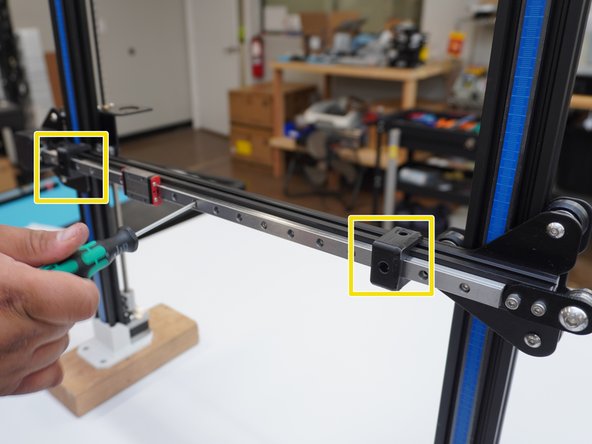
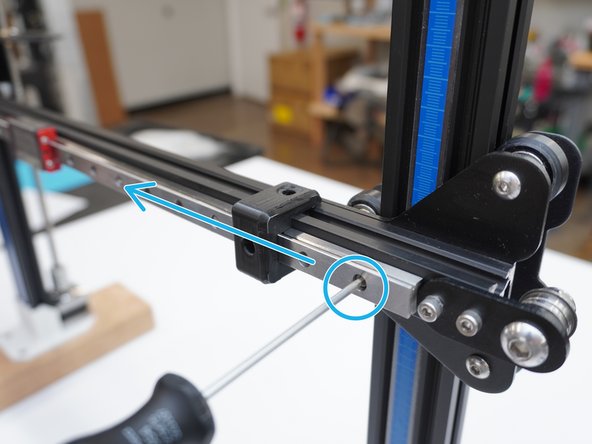
    • Install the Printed T-nut guide on the end of the X axis extrusion, and slide the rail on to the X-axis from Right to left

    • The guide helps to slide the T-nuts into the extrusion

  4. CR-10 V2  Linear Rail Kit Hotend Installation, Mounting the Rail: 4 단계, 이미지 3개 중 1개 CR-10 V2  Linear Rail Kit Hotend Installation, Mounting the Rail: 4 단계, 이미지 3개 중 2개 CR-10 V2  Linear Rail Kit Hotend Installation, Mounting the Rail: 4 단계, 이미지 3개 중 3개
    • Slide the rail until you have about 2-3 mm between the rail and the end of the X axis extrusion.

    • Use both Linear rail Guide to center the rail to the Aluminum extrusion

    • Tighten the mounting screws as you go down. Making sure to slide down, slide the linear rail guide down as each screw is tightened.

  5. CR-10 V2  Linear Rail Kit Hotend Installation, X Carriage install: 5 단계, 이미지 3개 중 1개 CR-10 V2  Linear Rail Kit Hotend Installation, X Carriage install: 5 단계, 이미지 3개 중 2개 CR-10 V2  Linear Rail Kit Hotend Installation, X Carriage install: 5 단계, 이미지 3개 중 3개
    • Belt adaptor

    • 4x M3x8 SHCS

    • 3x M3 split washers

    • M3 Hex nuts

    • Install the M3x8 SHCS screw with M3 Split washer in to the X carriage adaptor plate and mount to the Rail block.

    • Push up on the belt bracket, it is square against the bottom of the carriage block.

    • Note: If screws will not start, threading in. Spin the screws counterclockwise until you hear a click, and then tighten the screws evenly in an X pattern until they are fully tightened. This is to ensure that the threads do not get damaged.

    • Note, reference Hotend Mounting Instructions section before mounting the MGN 12 Adaptor Plates to the linear rail block. For installing Hex Nuts to the back of the Adaptors.

  6. CR-10 V2  Linear Rail Kit Hotend Installation, Linear Rail Kit Hotend Install: 6 단계, 이미지 1개 중 1개
    • All Stock hotend and extruder mounting screws are re-used for the CR10 V2/V2

    • M3x6 BHCS (+2mm longer than stock) screws are used to mount the stock Bl Touch bracket.

결론

To reassemble your device, follow these instructions in reverse order.

작성자

1다른 기여자 명과 함께

AJ Pereira

회원 가입일: 05/29/20

2,735 평판

안내서 16개를 작성함

Tiny Machines 3D Tiny Machines 3D 회원

Community

5 회원들

안내서 41개를 작성함

0가이드 댓글

댓글 쓰기

조회 통계:

지난 24시간: 0

지난 7일: 7

지난 30일: 34

전체 시간: 2,269