주요 콘텐츠로 건너뛰기

Canon EOS Rebel T4i LCD Screen Replacement

필요한 것

  1. Canon EOS Rebel T4i LCD Screen Replacement, Battery: 1 단계, 이미지 1개 중 1개
    • Locate the battery cover at the bottom of the camera.

    • Pull down on the black tab to open the cover.

  2. Canon EOS Rebel T4i LCD Screen Replacement: 2 단계, 이미지 1개 중 1개
    • Push the grey tab on the right side of the battery.

    • Remove the battery from the slot.

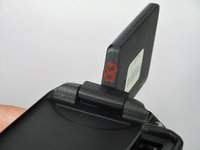
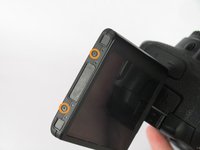
  3. Canon EOS Rebel T4i LCD Screen Replacement, LCD Screen: 3 단계, 이미지 3개 중 1개 Canon EOS Rebel T4i LCD Screen Replacement, LCD Screen: 3 단계, 이미지 3개 중 2개 Canon EOS Rebel T4i LCD Screen Replacement, LCD Screen: 3 단계, 이미지 3개 중 3개
    • Remove the six screws on the housing of the LCD.

    • Four 3.1mm JIS screws on the side with the hinge.

    • Two 2.7mm JIS screws

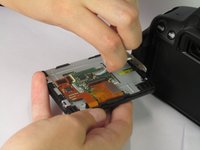
  4. Canon EOS Rebel T4i LCD Screen Replacement: 4 단계, 이미지 1개 중 1개
    • Remove the plastic back of the LCD.

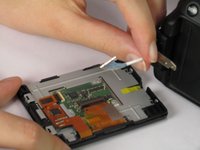
  5. Canon EOS Rebel T4i LCD Screen Replacement: 5 단계, 이미지 2개 중 1개 Canon EOS Rebel T4i LCD Screen Replacement: 5 단계, 이미지 2개 중 2개
    • Unplug the blue cable attached to the back of the LCD.

결론

To reassemble your device, follow these instructions in reverse order.

다른 7명이 해당 안내서를 완성하였습니다.

작성자

3다른 기여자 명과 함께

Jordan Rabold

회원 가입일: 04/14/14

807 평판

안내서 3개를 작성함

Cal Poly, Team 12-33, Maness Spring 2014 Cal Poly, Team 12-33, Maness Spring 2014 회원

CPSU-MANESS-S14S12G33

4 회원들

안내서 14개를 작성함

2가이드 댓글

where can I buy a replacement LCD screen for my EOS650D camera in Adelaide. Australia

rdmahony4 - 답글

If it helps any, the part number for the LCD screen is CG2-4025. You can also try just searching something like "Canon EOS 650D LCD screen" on eBay to find a replacement screen.

Zephosk -

댓글 쓰기

조회 통계:

지난 24시간: 0

지난 7일: 3

지난 30일: 20

전체 시간: 6,214