주요 콘텐츠로 건너뛰기

Canon PowerShot ELPH330 HS Camera Power/Shutter Button Panel Replacement

필요한 것

  1. Canon PowerShot ELPH330 HS Camera Power/Shutter Button Panel Replacement, Power/Shutter Button Panel: 1 단계, 이미지 2개 중 1개 Canon PowerShot ELPH330 HS Camera Power/Shutter Button Panel Replacement, Power/Shutter Button Panel: 1 단계, 이미지 2개 중 2개
    • On the top-center of your device, turn off the camera by pressing the power button.

    • Put your finger on the battery door and slide the battery door to the right to open it.

    • Push the release button downward and it will release the battery.

  2. Canon PowerShot ELPH330 HS Camera Power/Shutter Button Panel Replacement: 2 단계, 이미지 1개 중 1개
    • Use the Phillips #00 screwdriver to remove the screws.

  3. Canon PowerShot ELPH330 HS Camera Power/Shutter Button Panel Replacement: 3 단계, 이미지 1개 중 1개
    • Remove the two 4.0mm screws on the bottom of the camera located near the battery door using a Phillips #00 screwdriver.

  4. Canon PowerShot ELPH330 HS Camera Power/Shutter Button Panel Replacement: 4 단계, 이미지 1개 중 1개
    • At the bottom of the camera next to the battery door, remove two more screws using the Phillips #00 screwdriver.

  5. Canon PowerShot ELPH330 HS Camera Power/Shutter Button Panel Replacement: 5 단계, 이미지 1개 중 1개
    • To remove the back portion of the camera case, use your fingers to carefully pry the case apart at the seam.

  6. Canon PowerShot ELPH330 HS Camera Power/Shutter Button Panel Replacement: 6 단계, 이미지 2개 중 1개 Canon PowerShot ELPH330 HS Camera Power/Shutter Button Panel Replacement: 6 단계, 이미지 2개 중 2개
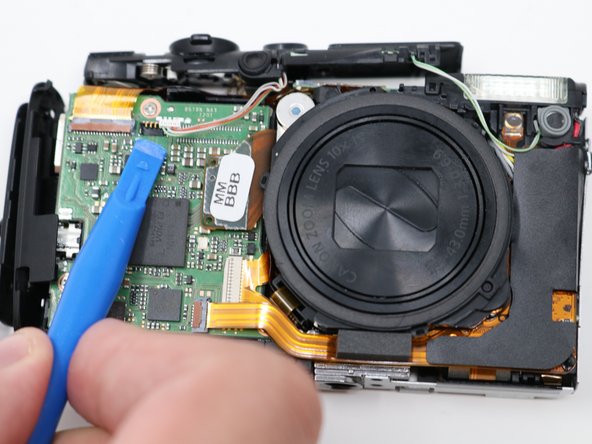
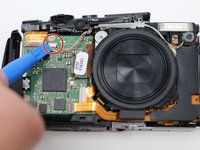
    • On the motherboard there should be a white port. Using the spudger, disconnect it from the motherboard.

  7. Canon PowerShot ELPH330 HS Camera Power/Shutter Button Panel Replacement: 7 단계, 이미지 1개 중 1개
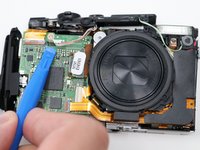
    • Follow the green and white wire. There is a gray piece of rubber holding the button into place. Remove it with the spudger.

  8. Canon PowerShot ELPH330 HS Camera Power/Shutter Button Panel Replacement: 8 단계, 이미지 1개 중 1개
    • Lift the panel off from the top of the camera with your hands.

결론

To reassemble your device, follow these instructions in reverse order.

작성자

6다른 기여자 명과 함께

Michelle Ngo

회원 가입일: 07/23/19

595 평판

안내서 3개를 작성함

UW Tacoma, Team S1-G3, Liner Summer 2019 UW Tacoma, Team S1-G3, Liner Summer 2019 회원

UWT-LINER-SU19S1G3

4 회원들

안내서 3개를 작성함

0가이드 댓글

댓글 쓰기

조회 통계:

지난 24시간: 0

지난 7일: 1

지난 30일: 9

전체 시간: 519