주요 콘텐츠로 건너뛰기

Canon PowerShot SD500 Digital ELPH Shutter Button Replacement

필요한 것

  1. Canon PowerShot SD500 Digital ELPH Shutter Button Replacement, Battery: 1 단계, 이미지 1개 중 1개
    • Slide open the battery cover.

    • Push the small orange tab to the side so the battery can be removed.

  2. Canon PowerShot SD500 Digital ELPH Shutter Button Replacement: 2 단계, 이미지 2개 중 1개 Canon PowerShot SD500 Digital ELPH Shutter Button Replacement: 2 단계, 이미지 2개 중 2개
    • Slide the battery out of the battery compartment.

  3. Canon PowerShot SD500 Digital ELPH Shutter Button Replacement, Front and Rear Casing: 3 단계, 이미지 2개 중 1개 Canon PowerShot SD500 Digital ELPH Shutter Button Replacement, Front and Rear Casing: 3 단계, 이미지 2개 중 2개
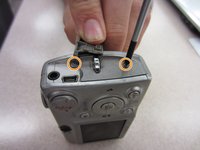
    • Two Phillips screws need to be removed using a #00 Phillips screwdriver. The upper screw is under the USB port cover, which can simply be pulled away gently from the casing. the lower screw is visible on the panel.

    • The screws are different sizes. The .125 inch screw is located under the USB port cover. The 0.85 inch screw goes in the lower hole on the panel.

    • When looking at the back of the camera, these two screws are on the right panel of the camera.

  4. Canon PowerShot SD500 Digital ELPH Shutter Button Replacement: 4 단계, 이미지 1개 중 1개
    • Remove the right side cover from the camera casing.

  5. Canon PowerShot SD500 Digital ELPH Shutter Button Replacement: 5 단계, 이미지 1개 중 1개
    • Remove a .07 inch Phillips screw using a #00 Phillips screwdriver.

  6. Canon PowerShot SD500 Digital ELPH Shutter Button Replacement: 6 단계, 이미지 1개 중 1개
    • Remove two .085 inch Phillips screws from the left side of the camera using a #00 Philips screwdriver.

  7. Canon PowerShot SD500 Digital ELPH Shutter Button Replacement: 7 단계, 이미지 1개 중 1개
    • Remove the left side cover from the camera.

  8. Canon PowerShot SD500 Digital ELPH Shutter Button Replacement: 8 단계, 이미지 1개 중 1개
    • Remove three .15 inch Phillips screws from the bottom of the camera using a #00 Phillips screwdriver.

  9. Canon PowerShot SD500 Digital ELPH Shutter Button Replacement: 9 단계, 이미지 2개 중 1개 Canon PowerShot SD500 Digital ELPH Shutter Button Replacement: 9 단계, 이미지 2개 중 2개
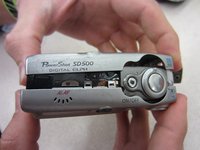
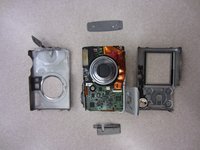
    • Once the casing is unscrewed, hold the camera with one side facing down, and lift the opposite face of the casing to open it.

    • Remove the internal camera components and layout out all pieces on a clean surface.

    • The front and back cover may require gentle rocking to remove.

  10. Canon PowerShot SD500 Digital ELPH Shutter Button Replacement, Shutter Button: 10 단계, 이미지 1개 중 1개
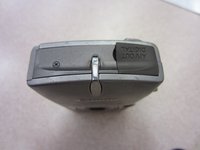
    • Unscrew one .235 inch long Phillips screw using a #00 Phillips screwdriver from the top of the camera.

  11. Canon PowerShot SD500 Digital ELPH Shutter Button Replacement: 11 단계, 이미지 1개 중 1개
    • Gently remove the shutter button unit from the rest of the camera.

결론

To reassemble your device, follow these instructions in reverse order.

작성자

3다른 기여자 명과 함께

Taylor Shields

회원 가입일: 10/13/14

846 평판

안내서 8개를 작성함

Clemson, Team 2-1, Benson Fall 2014 Clemson, Team 2-1, Benson Fall 2014 회원

CLEM-BENSON-F14S2G1

4 회원들

안내서 10개를 작성함

0가이드 댓글

댓글 쓰기

조회 통계:

지난 24시간: 0

지난 7일: 0

지난 30일: 6

전체 시간: 262