주요 콘텐츠로 건너뛰기

Canon PowerShot SD700 LCD screen Replacement

필요한 것

  1. Canon PowerShot SD700 LCD screen Replacement, Outside Case: 1 단계, 이미지 1개 중 1개
    • Turn off the camera by pressing the power button above the LCD screen.

  2. Canon PowerShot SD700 LCD screen Replacement: 2 단계, 이미지 1개 중 1개
    • Remove the two small screws on the bottom of the camera using a Phillips #00 screwdriver.

  3. Canon PowerShot SD700 LCD screen Replacement: 3 단계, 이미지 1개 중 1개
    • Use a Phillips #00 screwdriver to remove the two small screws on the right side of the camera.

  4. Canon PowerShot SD700 LCD screen Replacement: 4 단계, 이미지 1개 중 1개
    • Use a Phillips #00 screwdriver to remove the screw on the left of the camera under the A/V out digital label.

  5. Canon PowerShot SD700 LCD screen Replacement: 5 단계, 이미지 1개 중 1개
    • Use a Phillips #00 screwdriver to remove the screw on the bottom of the camera near the battery and memory card slots.

    • This screw will be longer than the rest of the screws.

  6. Canon PowerShot SD700 LCD screen Replacement: 6 단계, 이미지 1개 중 1개
    • Remove the front, back, and side casings from the camera and set to the side.

  7. Canon PowerShot SD700 LCD screen Replacement, LCD screen: 7 단계, 이미지 1개 중 1개
    • Remove the two screws that connect the LCD and backlight to the main body of the camera.

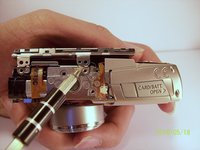
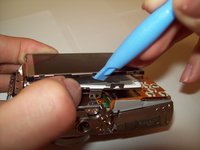
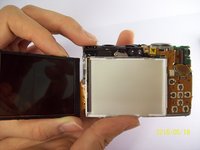
  8. Canon PowerShot SD700 LCD screen Replacement: 8 단계, 이미지 3개 중 1개 Canon PowerShot SD700 LCD screen Replacement: 8 단계, 이미지 3개 중 2개 Canon PowerShot SD700 LCD screen Replacement: 8 단계, 이미지 3개 중 3개
    • Gently pry the LCD and the backlight from the main body of the camera.

    • Gently pry the LCD from the backlight.

    • The thin ribbon cable is for the backlight.

    • The thick ribbon cable is for the LCD screen.

  9. Canon PowerShot SD700 LCD screen Replacement: 9 단계, 이미지 1개 중 1개
    • Carefully lift the ZIF connector that covers the thick ribbon cable.

    • This ZIF connector is fragile. Use caution when lifting it from its down position.

    • Insert the new LCD and reassemble the camera.

결론

To reassemble your device, follow these instructions in reverse order.

다른 2명이 해당 안내서를 완성하였습니다.

작성자

5다른 기여자 명과 함께

Emilio Rossi

회원 가입일: 04/07/11

113 평판

안내서 3개를 작성함

Cal Poly, Team 9-71, Walters Spring 2011 Cal Poly, Team 9-71, Walters Spring 2011 회원

CPSU-WALTERS-S11S9G71

4 회원들

안내서 9개를 작성함

0가이드 댓글

댓글 쓰기

조회 통계:

지난 24시간: 0

지난 7일: 1

지난 30일: 12

전체 시간: 2,840