주요 콘텐츠로 건너뛰기

Casio FX-115ES PLUS Battery Replacement

필요한 것

  1. Casio FX-115ES PLUS Battery Replacement, Battery: 1 단계, 이미지 1개 중 1개
    • Turn off the calculator by pressing the [shift] button.

    • Press the [AC] [OFF] button to turn off the calculator by pressing the [shift] button.

  2. Casio FX-115ES PLUS Battery Replacement: 2 단계, 이미지 3개 중 1개 Casio FX-115ES PLUS Battery Replacement: 2 단계, 이미지 3개 중 2개 Casio FX-115ES PLUS Battery Replacement: 2 단계, 이미지 3개 중 3개
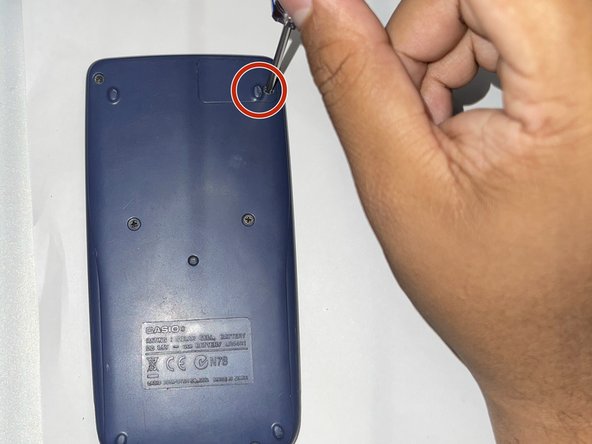
    • Turn the calculator the other way around so that the small panel in the top right corner of the back of the calculator faces forward.

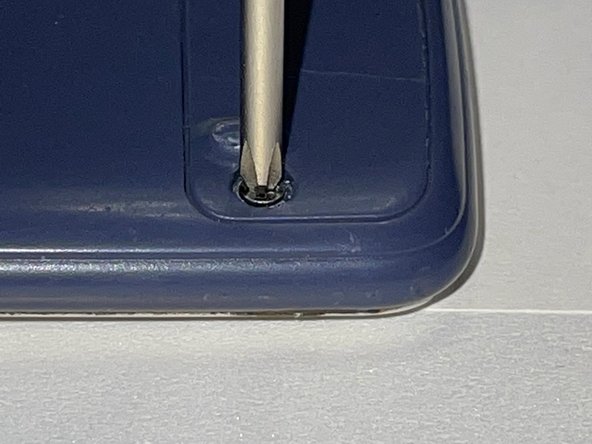
    • Use a Phillips #0 screwdriver to remove the screw in the upper right corner.

    • Don't force the screwdriver on the screw, as it can strip the screw

  3. Casio FX-115ES PLUS Battery Replacement: 3 단계, 이미지 1개 중 1개
    • Remove the battery cover.

  4. Casio FX-115ES PLUS Battery Replacement: 4 단계, 이미지 1개 중 1개
    • Insert the spudger in the available slot in the middle of the right side.

    • Use the spudger to take the battery out carefully.

    • Be careful when removing the battery to avoid any damage.

  5. Casio FX-115ES PLUS Battery Replacement: 5 단계, 이미지 1개 중 1개
    • Place the new 357 oxide button battery into the calculator.

    • Make sure that the + sign is at the bottom.

  6. Casio FX-115ES PLUS Battery Replacement: 6 단계, 이미지 3개 중 1개 Casio FX-115ES PLUS Battery Replacement: 6 단계, 이미지 3개 중 2개 Casio FX-115ES PLUS Battery Replacement: 6 단계, 이미지 3개 중 3개
    • Reattach the battery cover.

    • Insert the screw back in place along with the cover using a Phillips #0 screwdriver.

    • Make sure to turn the screwdriver clockwise to lock the screw in tight, preventing the battery from falling out.

  7. Casio FX-115ES PLUS Battery Replacement: 7 단계, 이미지 1개 중 1개
    • Reset the calculator by pressing [ON].

    • Press the [Shift] button.

    • Press the [9] [CLR] button to clear the data.

    • Press the [3] [ALL] button option.

    • Press the [=] [yes] button to accept.

    • Press the [AC] key to reset completely.

결론

You have successfully replaced a Casio FX-115ES PLUS battery

작성자

1다른 기여자 명과 함께

Rodrigo Lopez

회원 가입일: 01/23/23

145 평판

안내서 1개를 작성함

CSU Los Angeles, Team 2-1, Briggs Spring 2023 CSU Los Angeles, Team 2-1, Briggs Spring 2023 회원

CSULA-BRIGGS-S23S2G1

2 회원들

안내서 2개를 작성함

0가이드 댓글

댓글 쓰기

조회 통계:

지난 24시간: 2

지난 7일: 17

지난 30일: 89

전체 시간: 3,679