주요 콘텐츠로 건너뛰기

Casio FX-991ES Plus Battery Replacement

필요한 것

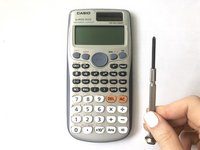
  1. Casio FX-991ES Plus Battery Replacement, Battery: 1 단계, 이미지 1개 중 1개
    • Make sure the calculator is off. If not, turn it off by pressing the [Shift] button then the [AC] [OFF] button.

  2. Casio FX-991ES Plus Battery Replacement: 2 단계, 이미지 1개 중 1개
    • Flip the calculator upside down and lay it on a flat surface.

    • Do not press hard on the calculator to avoid turning it on by mistake.

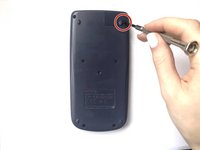
  3. Casio FX-991ES Plus Battery Replacement: 3 단계, 이미지 2개 중 1개 Casio FX-991ES Plus Battery Replacement: 3 단계, 이미지 2개 중 2개
    • Use a Phillips #0 screwdriver to unscrew the 1.6 mm screw on the battery cover.

    • Remove the battery cover.

    • Be gentle while unscrewing the cover, to avoid damaging it.

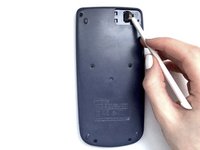
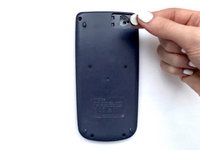
  4. Casio FX-991ES Plus Battery Replacement: 4 단계, 이미지 3개 중 1개 Casio FX-991ES Plus Battery Replacement: 4 단계, 이미지 3개 중 2개 Casio FX-991ES Plus Battery Replacement: 4 단계, 이미지 3개 중 3개
    • Use a spudger to remove the old battery. Insert it in the empty slot to pry out the battery.

    • Do not use a sharp item like a knife.

    • Do not use metal tools, to avoid damaging parts of the battery compartment.

  5. Casio FX-991ES Plus Battery Replacement: 5 단계, 이미지 1개 중 1개
    • Place the new battery into the compartment with the positive (+) side facing upwards.

  6. Casio FX-991ES Plus Battery Replacement: 6 단계, 이미지 1개 중 1개
    • Attach the battery cover and tighten the screw with a Phillips #0 screwdriver.

  7. Casio FX-991ES Plus Battery Replacement: 7 단계, 이미지 1개 중 1개
    • To reset the calculator, press the [ON] button.

    • Press the [SHIFT] button.

    • Press the [9] [CLR] button to clear the data.

    • Press the [3] button to choose "ALL".

    • Press the [=] button to agree.

    • Press the [AC] button

결승점

다른 20명이 해당 안내서를 완성하였습니다.

작성자

3다른 기여자 명과 함께

Zinab Alhamoud

회원 가입일: 01/17/21

679 평판

안내서 1개를 작성함

6가이드 댓글

Thank you so much! God bless you.

Igor Diniz - 답글

Can you send me one please

In Jaigaon india

chandra giri - 답글

La touche ON de ma calculatrice ne fonctionne plus comment faire ?

Emmanuel Prosper - 답글

Merci du fond du cœur 🫶🫶🫶

Malik Guellour - 답글

댓글 쓰기

조회 통계:

지난 24시간: 33

지난 7일: 243

지난 30일: 1,225

전체 시간: 82,839