주요 콘텐츠로 건너뛰기

DJI Phantom 2 Vision+ Propellers Removal

필요한 것

  1. DJI Phantom 2 Vision+ Propellers Removal, Remove the battery: 1 단계, 이미지 3개 중 1개 DJI Phantom 2 Vision+ Propellers Removal, Remove the battery: 1 단계, 이미지 3개 중 2개 DJI Phantom 2 Vision+ Propellers Removal, Remove the battery: 1 단계, 이미지 3개 중 3개
    • Pinch the top and bottom tabs of the battery case, pull the battery straight out to remove it.

    • The metal connectors form a stiff mechanical connection with the battery, you will need quite a bit of force to remove the battery. Hold the Phantom Vision+ with one hand and remove the battery with the other.

  2. DJI Phantom 2 Vision+ Propellers Removal, Propellers: 2 단계, 이미지 1개 중 1개
    • Determine if the propellor is clockwise or counter-clockwise rotating.

    • Each arm is labeled with a rotation icon that shows the direction of propellor rotation.

    • If this icon is missing or you can't read it, you can determine the direction of rotation by examining the propellor.

    • A clockwise rotating propellor pushes air down while rotating clockwise, and the opposite is true for a counter-clockwise rotating propellor, and the propellor blade slopes up in the direction of rotation.

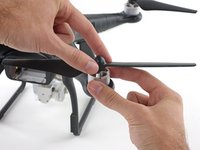
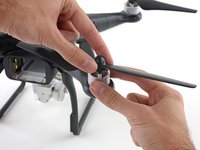
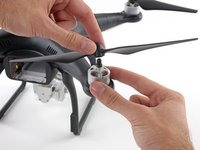
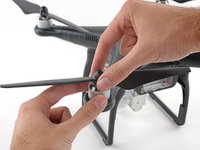
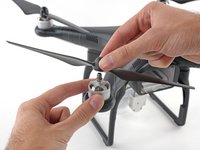
  3. DJI Phantom 2 Vision+ Propellers Removal, Removing clockwise rotating propellers: 3 단계, 이미지 3개 중 1개 DJI Phantom 2 Vision+ Propellers Removal, Removing clockwise rotating propellers: 3 단계, 이미지 3개 중 2개 DJI Phantom 2 Vision+ Propellers Removal, Removing clockwise rotating propellers: 3 단계, 이미지 3개 중 3개
    • Loosen a clockwise rotating propeller by holding the motor with one hand and spinning the propellor clockwise.

    • Remove the propellor.

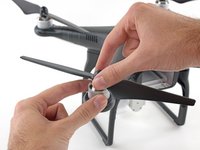
  4. DJI Phantom 2 Vision+ Propellers Removal, Removing counter-clockwise rotating propellers: 4 단계, 이미지 3개 중 1개 DJI Phantom 2 Vision+ Propellers Removal, Removing counter-clockwise rotating propellers: 4 단계, 이미지 3개 중 2개 DJI Phantom 2 Vision+ Propellers Removal, Removing counter-clockwise rotating propellers: 4 단계, 이미지 3개 중 3개
    • Loosen a counter-clockwise rotating propeller by holding the motor with one hand and spinning the propellor counter-clockwise.

    • Remove the propellor.

결론

To reassemble your device, follow these instructions in reverse order.

다른 5명이 해당 안내서를 완성하였습니다.

작성자

2다른 기여자 명과 함께

David Hoyt

회원 가입일: 04/09/10

4,053 평판

안내서 41개를 작성함

Cal Poly, Team 25-89, Amido Spring 2010 Cal Poly, Team 25-89, Amido Spring 2010 회원

CPSU-AMIDO-S10S25G89

4 회원들

안내서 61개를 작성함

0가이드 댓글

댓글 쓰기

조회 통계:

지난 24시간: 0

지난 7일: 5

지난 30일: 15

전체 시간: 7,304