주요 콘텐츠로 건너뛰기

Dell Inspiron 15-3542 LCD Screen Replacement

필요한 것

  1. Dell Inspiron 15-3542 LCD Screen Replacement, LCD Screen: 1 단계, 이미지 3개 중 1개 Dell Inspiron 15-3542 LCD Screen Replacement, LCD Screen: 1 단계, 이미지 3개 중 2개 Dell Inspiron 15-3542 LCD Screen Replacement, LCD Screen: 1 단계, 이미지 3개 중 3개
    • Power off the laptop.

    • Flip the laptop over so the bottom is facing up.

    • Slide the right button to the unlock symbol.

    • Slide the left button to the other unlock symbol.

    • While holding the left button, use your right finger to raise the battery up from the laptop.

  2. Dell Inspiron 15-3542 LCD Screen Replacement: 2 단계, 이미지 3개 중 1개 Dell Inspiron 15-3542 LCD Screen Replacement: 2 단계, 이미지 3개 중 2개 Dell Inspiron 15-3542 LCD Screen Replacement: 2 단계, 이미지 3개 중 3개
    • Flip the laptop over so the top is facing up and open the laptop.

    • Using both hands, unsnap the tabs around the perimeter of the bezel and remove it from the laptop.

  3. Dell Inspiron 15-3542 LCD Screen Replacement: 3 단계, 이미지 3개 중 1개 Dell Inspiron 15-3542 LCD Screen Replacement: 3 단계, 이미지 3개 중 2개 Dell Inspiron 15-3542 LCD Screen Replacement: 3 단계, 이미지 3개 중 3개
    • Remove the four screws from the corners of the LCD using a Phillips screwdriver.

    • Lift the screen up and place it on the keyboard.

  4. Dell Inspiron 15-3542 LCD Screen Replacement: 4 단계, 이미지 3개 중 1개 Dell Inspiron 15-3542 LCD Screen Replacement: 4 단계, 이미지 3개 중 2개 Dell Inspiron 15-3542 LCD Screen Replacement: 4 단계, 이미지 3개 중 3개
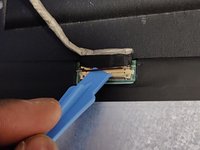
    • Gently peel off the yellow clear tape securing the video connector.

    • Use an opening tool to flip open the video connector bracket.

    • Make sure not to force the video cable when removing it from the connector bracket.

    • Disconnect the cable from the LCD screen and remove the LCD from the laptop.

결론

To reassemble your device, follow these instructions in reverse order.

다른 2명이 해당 안내서를 완성하였습니다.

작성자

1다른 기여자 명과 함께

Najeemdeen Lamidi

회원 가입일: 09/19/20

151 평판

안내서 1개를 작성함

0가이드 댓글

댓글 쓰기

조회 통계:

지난 24시간: 1

지난 7일: 4

지난 30일: 18

전체 시간: 1,349