주요 콘텐츠로 건너뛰기
수리 커뮤니티 가입 - 계정 만들기

Dell Inspiron 15-7537 RAM Replacement

필요한 것

  1. Dell Inspiron 15-7537 RAM Replacement, Bottom Case: 1 단계, 이미지 1개 중 1개
    • Make sure the display is closed. Then, flip the computer over so that you can see the bottom cover.

    • Loosen the two 5 mm Phillips #0 on the upper edge of the cover.

    • These screws will stay captive to the case.

  2. Dell Inspiron 15-7537 RAM Replacement: 2 단계, 이미지 1개 중 1개
    • Remove the two 5 mm interior screws that connect the cover to the assembly using the same Philips head screwdriver from the previous step.

  3. Dell Inspiron 15-7537 RAM Replacement: 3 단계, 이미지 1개 중 1개
    • Use a spudger to remove the base cover from the rest of bottom cover.

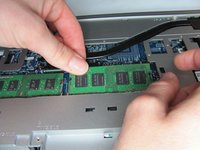
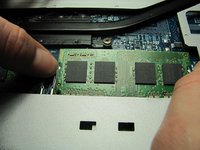
  4. Dell Inspiron 15-7537 RAM Replacement, RAM: 4 단계, 이미지 2개 중 1개 Dell Inspiron 15-7537 RAM Replacement, RAM: 4 단계, 이미지 2개 중 2개
    • Gently pull apart clips on the ends of the memory module until the memory module pops up.

  5. Dell Inspiron 15-7537 RAM Replacement: 5 단계, 이미지 1개 중 1개
    • Pull the RAM out at a 45 degree angle.

결론

To reassemble your device, follow these instructions in reverse order.

다른 2명이 해당 안내서를 완성하였습니다.

작성자

3다른 기여자 명과 함께

Jean Whitmore

회원 가입일: 01/22/15

984 평판

안내서 7개를 작성함

Cal Poly, Team 18-2, Maness Winter 2015 Cal Poly, Team 18-2, Maness Winter 2015 회원

CPSU-MANESS-W15S18G2

4 회원들

안내서 8개를 작성함

0가이드 댓글

댓글 쓰기

조회 통계:

지난 24시간: 1

지난 7일: 15

지난 30일: 59

전체 시간: 2,716