주요 콘텐츠로 건너뛰기

Dell Inspiron 1546 Display Assembly Replacement

필요한 것

  1. Dell Inspiron 1546 Display Assembly Replacement, Remove the Cables: 1 단계, 이미지 1개 중 1개
    • WARNING: Before working inside your computer, read the safety information that shipped with your computer. Follow the procedures in Before You Begin.

    • CAUTION: To avoid electrostatic discharge, ground yourself by using a wrist grounding strap or by periodically touching an unpainted metal surface (such as a connector on your computer).

    • Make note of the Mini-Card antenna cables routing and remove the cables from the routing guides.

  2. Dell Inspiron 1546 Display Assembly Replacement, Remove the Screws: 2 단계, 이미지 1개 중 1개
    • Remove the two screws from the computer base.

  3. Dell Inspiron 1546 Display Assembly Replacement, Dislodge the Cables: 3 단계, 이미지 1개 중 1개
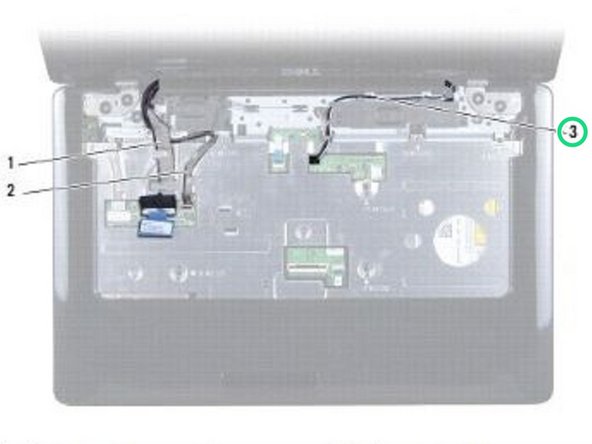
    • Make note of the Mini-Card antenna cable routing and carefully dislodge the antenna cables from the cable routing slot on the computer. Pull the cables away, so that they are clear of the palm rest.

  4. Dell Inspiron 1546 Display Assembly Replacement, Disconnect the Cable: 4 단계, 이미지 1개 중 1개
    • Disconnect the display cable and camera cable from the respective system board connectors and remove them from their routing guides.

  5. Dell Inspiron 1546 Display Assembly Replacement, Remove the Screws: 5 단계, 이미지 1개 중 1개
    • Remove the four screws that secure the display assembly to the computer base.

  6. Dell Inspiron 1546 Display Assembly Replacement, Remove the Display Assembly: 6 단계, 이미지 1개 중 1개
    • Lift and remove the display assembly from the computer base.

  7. Dell Inspiron 1546 Display Assembly Replacement, Place the Display Assembly: 7 단계, 이미지 1개 중 1개
    • Place the display assembly in position and replace the four screws that secure the display assembly to the computer base.

  8. Dell Inspiron 1546 Display Assembly Replacement, Route the Display Cable: 8 단계, 이미지 1개 중 1개
    • Route the display cable and camera cable into their routing guides and connect the cables to the respective system board connectors.

  9. Dell Inspiron 1546 Display Assembly Replacement, Route the Antenna Cables: 9 단계, 이미지 1개 중 1개
    • Route the Mini-Card antenna cables, and guide the cables to the bottom of the computer through the cable routing slot.

  10. Dell Inspiron 1546 Display Assembly Replacement, Replace the Screws: 10 단계, 이미지 1개 중 1개
    • Replace the two screws at the bottom of the computer.

결승점

작성자

1다른 기여자 명과 함께

Terrence15

회원 가입일: 12/18/17

79,858 평판

안내서 441개를 작성함

RampUP America, Inc. RampUP America, Inc. 회원

Community

43 회원들

안내서 1,994개를 작성함

0가이드 댓글

댓글 쓰기

조회 통계:

지난 24시간: 0

지난 7일: 0

지난 30일: 6

전체 시간: 210