주요 콘텐츠로 건너뛰기
수리 커뮤니티 가입 - 계정 만들기

Dell Inspiron 9100 Fan 3 Replacement

필요한 것

  1. Dell Inspiron 9100 Fan 3 Replacement, Battery: 1 단계, 이미지 3개 중 1개 Dell Inspiron 9100 Fan 3 Replacement, Battery: 1 단계, 이미지 3개 중 2개 Dell Inspiron 9100 Fan 3 Replacement, Battery: 1 단계, 이미지 3개 중 3개
    • Unplug the laptop from the power adapter and turn the power off.

    • Failure to unplug laptop before proceeding could result in risk of electric shock!

  2. Dell Inspiron 9100 Fan 3 Replacement: 2 단계, 이미지 3개 중 1개 Dell Inspiron 9100 Fan 3 Replacement: 2 단계, 이미지 3개 중 2개 Dell Inspiron 9100 Fan 3 Replacement: 2 단계, 이미지 3개 중 3개
    • Slide the battery-lock tab and hold.

    • Flip the battery away from the chassis to remove it.

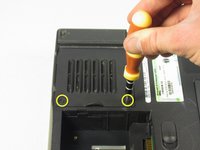
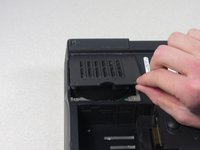
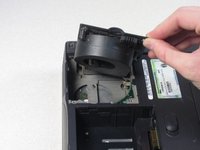
  3. Dell Inspiron 9100 Fan 3 Replacement, Fan 3: 3 단계, 이미지 3개 중 1개 Dell Inspiron 9100 Fan 3 Replacement, Fan 3: 3 단계, 이미지 3개 중 2개 Dell Inspiron 9100 Fan 3 Replacement, Fan 3: 3 단계, 이미지 3개 중 3개
    • Undo the two screws on the fan cover plate labeled "F3", they will remain in the panel.

    • These screws will remain in the panel

    • Lift up on the side of the fan nearest the screws to release the fan module

결론

To reassemble your device, follow these instructions in reverse order.

작성자

6다른 기여자 명과 함께

charlierefvem

회원 가입일: 01/11/11

854 평판

안내서 7개를 작성함

Cal Poly, Team 13-2, Forte Winter 2011 Cal Poly, Team 13-2, Forte Winter 2011 회원

CPSU-FORTE-W11S13G2

5 회원들

안내서 8개를 작성함

0가이드 댓글

댓글 쓰기

조회 통계:

지난 24시간: 3

지난 7일: 15

지난 30일: 82

전체 시간: 2,314