주요 콘텐츠로 건너뛰기

Dell Inspiron M5110 Module Cover Replacement

단지 전제 조건
이 가이드는 전제 조건 전용 가이드입니다! 이 가이드는 다른 절차의 일부이며 단독으로 사용할 수 없습니다.

필요한 것

  1. Dell Inspiron M5110 Module Cover  Replacement, Battery: 1 단계, 이미지 1개 중 1개
    • Shut down the computer and turn it upside down.

  2. Dell Inspiron M5110 Module Cover  Replacement: 2 단계, 이미지 1개 중 1개
    • Slide both of the battery release latches on the bottom of the device in towards the center of the computer.

  3. Dell Inspiron M5110 Module Cover  Replacement: 3 단계, 이미지 1개 중 1개
    • Slide and lift the battery up and out from the device.

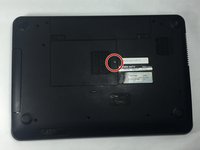
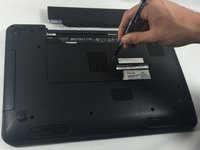
  4. Dell Inspiron M5110 Module Cover  Replacement, Module Cover: 4 단계, 이미지 2개 중 1개 Dell Inspiron M5110 Module Cover  Replacement, Module Cover: 4 단계, 이미지 2개 중 2개
    • Remove the 5 mm Phillips # 0 screw in the middle of the device.

  5. Dell Inspiron M5110 Module Cover  Replacement: 5 단계, 이미지 1개 중 1개
    • Remove the module cover pressing in the release tabs and pulling the cover up and away from the base of the device.

결론

To reassemble your device, follow these instructions in reverse order.

작성자

1다른 기여자 명과 함께

Cody Flynn

회원 가입일: 10/18/16

334 평판

안내서 4개를 작성함

UMass Dartmouth, Team 4-3, Catania Fall 2016 UMass Dartmouth, Team 4-3, Catania Fall 2016 회원

UMASSD-CATANIA-F16S4G3

3 회원들

안내서 8개를 작성함

0가이드 댓글

댓글 쓰기

조회 통계:

지난 24시간: 0

지난 7일: 0

지난 30일: 1

전체 시간: 70