주요 콘텐츠로 건너뛰기

Dell Precision M4700 Keyboard Replacement

필요한 것

  1. Dell Precision M4700 Keyboard Replacement, Battery: 1 단계, 이미지 2개 중 1개 Dell Precision M4700 Keyboard Replacement, Battery: 1 단계, 이미지 2개 중 2개
    • Slide the release latch to unlock the battery.

    • Flip and remove the battery from the computer.

  2. Dell Precision M4700 Keyboard Replacement, Base Cover: 2 단계, 이미지 2개 중 1개 Dell Precision M4700 Keyboard Replacement, Base Cover: 2 단계, 이미지 2개 중 2개
    • Remove the screws that secure the base cover to the computer. Press the rubber tabs towards the rear of the computer to disengage the base cover.

    • Flip and remove the base cover from the computer.

  3. Dell Precision M4700 Keyboard Replacement, Keyboard Trim: 3 단계, 이미지 2개 중 1개 Dell Precision M4700 Keyboard Replacement, Keyboard Trim: 3 단계, 이미지 2개 중 2개
    • Pry up the keyboard trim starting from the top-inner edge.

    • Pry up the bottom edge of the keyboard trim from the top-inner edge.

  4. Dell Precision M4700 Keyboard Replacement, Keyboard: 4 단계, 이미지 3개 중 1개 Dell Precision M4700 Keyboard Replacement, Keyboard: 4 단계, 이미지 3개 중 2개 Dell Precision M4700 Keyboard Replacement, Keyboard: 4 단계, 이미지 3개 중 3개
    • Remove the screws that secure the keyboard to the computer.

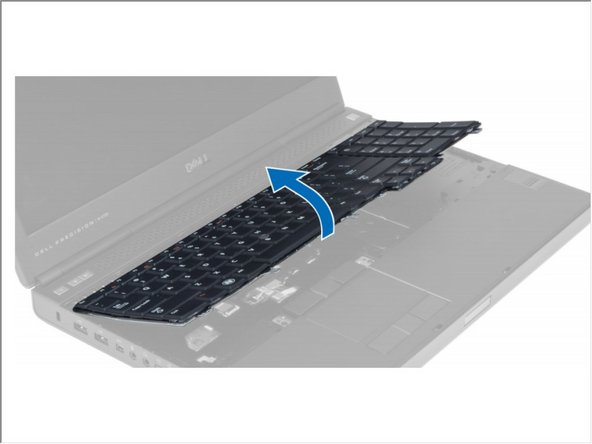
    • Starting from the bottom of the keyboard, separate the keyboard from the computer and flip the keyboard over.

    • Disconnect the keyboard-data cable from the system board and remove the keyboard.

결론

To reassemble your device, follow these instructions in reverse order.

작성자

2다른 기여자 명과 함께

Johnathan Hammond

회원 가입일: 02/28/18

45,555 평판

안내서 408개를 작성함

RampUP America, Inc. RampUP America, Inc. 회원

Community

43 회원들

안내서 1,994개를 작성함

0가이드 댓글

댓글 쓰기

조회 통계:

지난 24시간: 0

지난 7일: 5

지난 30일: 8

전체 시간: 1,383