주요 콘텐츠로 건너뛰기

Dexcom G6 Receiver Battery Replacement

필요한 것

  1. Dexcom G6 Receiver Battery Replacement, Display and Front Bezel: 1 단계, 이미지 1개 중 1개
    • Unscrew the 6 Torx T5 screws from the back of the device

  2. Dexcom G6 Receiver Battery Replacement: 2 단계, 이미지 2개 중 1개 Dexcom G6 Receiver Battery Replacement: 2 단계, 이미지 2개 중 2개
    • Use a spudger to lift up the screen assembly ribbon cable flap, then remove the ribbon cable.

    • Screen Information: Model AM0310R-04 Lot # NHT18080052

  3. Dexcom G6 Receiver Battery Replacement, Charging Port: 3 단계, 이미지 1개 중 1개
    • Using a spudger, unplug the Charging Port connector from the motherboard.

  4. Dexcom G6 Receiver Battery Replacement: 4 단계, 이미지 1개 중 1개
    • Remove the 2 silver Torx T5 screws holding the charging port down.

  5. Dexcom G6 Receiver Battery Replacement: 5 단계, 이미지 1개 중 1개
    • Remove the Charging Port Assembly from the motherboard.

  6. Dexcom G6 Receiver Battery Replacement, Motherboard: 6 단계, 이미지 1개 중 1개
    • Remove the silver Torx T5 screw holding the motherboard down.

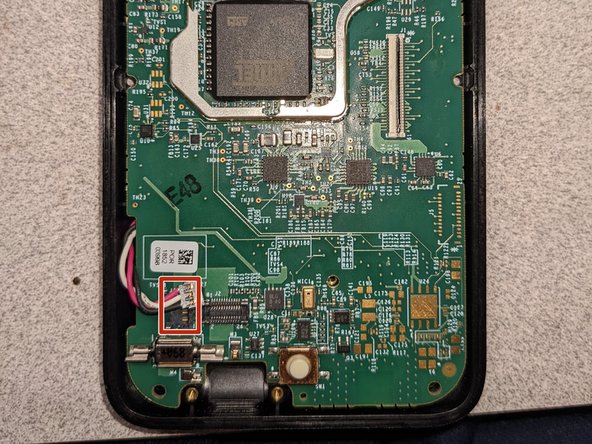
  7. Dexcom G6 Receiver Battery Replacement: 7 단계, 이미지 2개 중 1개 Dexcom G6 Receiver Battery Replacement: 7 단계, 이미지 2개 중 2개
    • Using a spudger, carefully remove the battery connector on the left side of the motherboard.

  8. Dexcom G6 Receiver Battery Replacement: 8 단계, 이미지 1개 중 1개
    • Using a spudger, carefully pry up the motherboard to remove it.

  9. Dexcom G6 Receiver Battery Replacement, Battery: 9 단계, 이미지 3개 중 1개 Dexcom G6 Receiver Battery Replacement, Battery: 9 단계, 이미지 3개 중 2개 Dexcom G6 Receiver Battery Replacement, Battery: 9 단계, 이미지 3개 중 3개
    • Use heat to soften the adhesive holding the battery down.

    • Carefully use one or more opening picks to remove the adhesive holding the battery down, then remove the battery.

결론

To reassemble your device, follow these instructions in reverse order.

다른 4명이 해당 안내서를 완성하였습니다.

작성자

1다른 기여자 명과 함께

Andrew S

회원 가입일: 07/30/21

15,453 평판

안내서 8개를 작성함

10가이드 댓글

Where do you get battery? Dexcom won't sell it.

Richy - 답글

I'm not sure you can get this same battery somewhere else (I haven't performed a battery change myself, just took it apart for demonstration). I'll get back to you if I can figure out a way to use another battery.

Andrew S -

@richy14330 The connector type is JST ACHR-03V.

Andrew S - 답글

Still looking ... Where to get a battery for this receiver? What type of battery is it ?

Julian Payne (Xfactor) - 답글

I don't think you can get a replacement battery for this device anywhere. It is a 950 mAh 06220 battery made by Jhih Hong Technology. The model number seems to be BAT000023 and the type is 1ICP4/44/59.

Andrew S -

댓글 쓰기

조회 통계:

지난 24시간: 1

지난 7일: 17

지난 30일: 56

전체 시간: 4,725