소개
If your Digiland DL718M tablet’s camera is cracked, dysfunctional, or producing low-quality photos, use this guide to replace the camera lens.
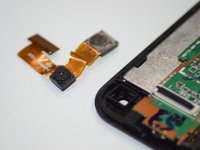
Both the front-facing camera and rear-facing camera are attached to each other and to the motherboard; thus, if one lens is failing, both lenses will need to be replaced using the steps in this guide.
This process requires you to remove the back panel of the device and thus expose the motherboard. Be careful when working with an exposed motherboard as you could damage it, if it comes into contact with moisture. It is motion sensitive, and small aspects can be easily jostled out of place.
Before beginning, power the tablet off and disconnect it from any external power source.
필요한 것
-
-
Remove back panel by wedging the iFixit opening tool on all four sides of the device.
-
-
-
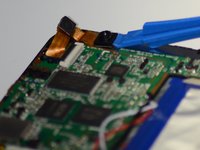
Lift up the black tab on the motherboard using an opening tool, and slide the ribbon out of the slot beneath the black tab.
-
-


To reassemble your device, follow these instructions in reverse order.


팀

Grand Valley State University, Team S4-G4, DeVasto Fall 2019 Grand Valley State University, Team S4-G4, DeVasto Fall 2019 회원
GVSU-DEVASTO-F19S4G4
4 회원들
안내서 6개를 작성함
