주요 콘텐츠로 건너뛰기

Disassembling 8BitDo Pro 2 Wired Joystick Board

필요한 것

  1. Disassembling 8BitDo Pro 2 Wired Joystick Board, Remove R2 and L2 pads: 1 단계, 이미지 2개 중 1개 Disassembling 8BitDo Pro 2 Wired Joystick Board, Remove R2 and L2 pads: 1 단계, 이미지 2개 중 2개
    • Remove both pads by pushing them up.

  2. Disassembling 8BitDo Pro 2 Wired Joystick Board, Remove T6 Screws: 2 단계, 이미지 1개 중 1개
    • Remove both Torx T6 screws from the back.

  3. Disassembling 8BitDo Pro 2 Wired Joystick Board, Open the controller: 3 단계, 이미지 3개 중 1개 Disassembling 8BitDo Pro 2 Wired Joystick Board, Open the controller: 3 단계, 이미지 3개 중 2개 Disassembling 8BitDo Pro 2 Wired Joystick Board, Open the controller: 3 단계, 이미지 3개 중 3개
    • With an opening pick, detach the seven clips holding the faceplate. Start from the sides, towards the bottom.

    • Detach the remaining clips by carefully raising the faceplate away from the clips.

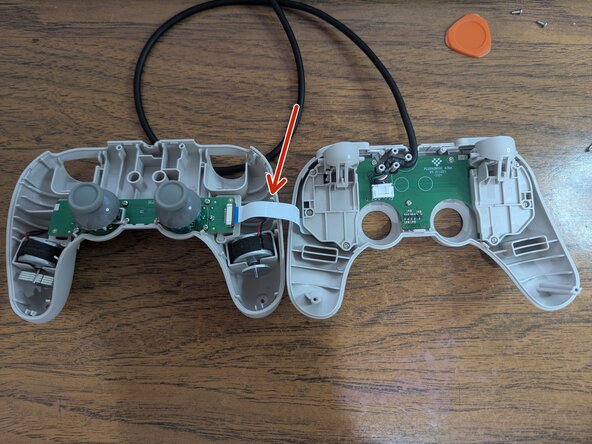
    • A flex cable joins both plates.

    • Move the faceplate to the side.

  4. Disassembling 8BitDo Pro 2 Wired Joystick Board, Remove the flex cable: 4 단계, 이미지 1개 중 1개
    • Push the sides of the connector away from it to free the cable.

  5. Disassembling 8BitDo Pro 2 Wired Joystick Board, Remove the #0 screws: 5 단계, 이미지 1개 중 1개
    • Remove the 8 screws using a Phillips #0 screwdriver.

    • You can remove the joystick caps by lifting them.

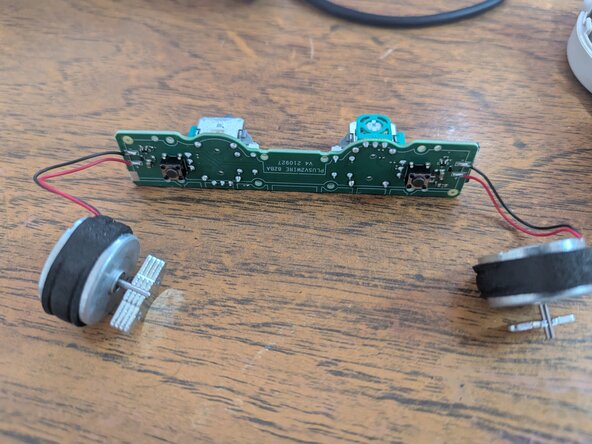
  6. Disassembling 8BitDo Pro 2 Wired Joystick Board, Remove the board: 6 단계, 이미지 2개 중 1개 Disassembling 8BitDo Pro 2 Wired Joystick Board, Remove the board: 6 단계, 이미지 2개 중 2개
    • Slowly lift the board from the controller. Make sure to lift both rumble motors as well.

결론

To reassemble your device, follow these instructions in reverse order.

작성자

1다른 기여자 명과 함께

Adrián

회원 가입일: 01/22/23

173 평판

안내서 1개를 작성함

0가이드 댓글

댓글 쓰기

조회 통계:

지난 24시간: 4

지난 7일: 21

지난 30일: 94

전체 시간: 462