주요 콘텐츠로 건너뛰기
수리 커뮤니티 가입 - 계정 만들기

Disassembling 8BitDo Ultimate Wireless Case

필요한 것

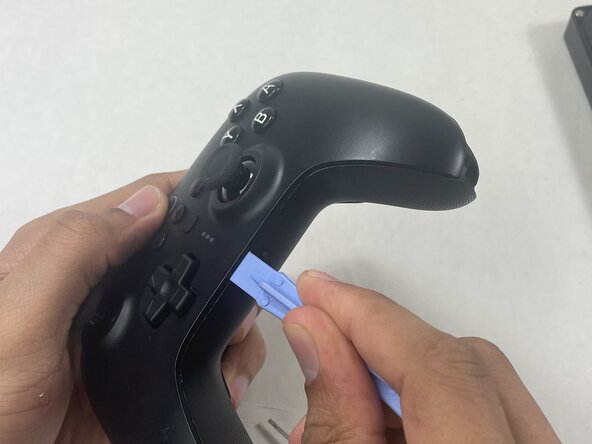
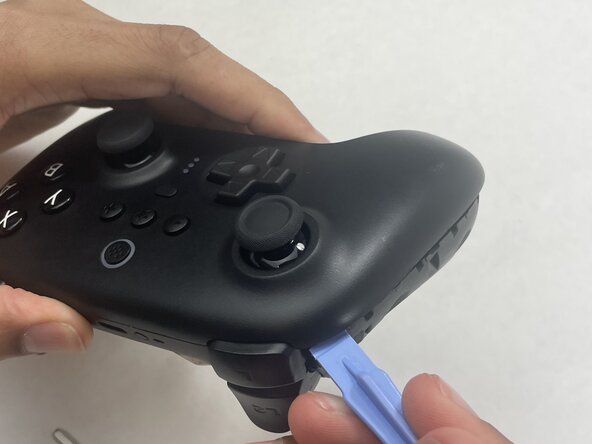
  1. Disassembling 8BitDo Ultimate Wireless Case, Case: 1 단계, 이미지 2개 중 1개 Disassembling 8BitDo Ultimate Wireless Case, Case: 1 단계, 이미지 2개 중 2개
    • Insert an opening pick into the seam between the left controller grip and main controller body.

    • Pry the grip off.

    • Repeat for the right grip.

    댓글 쓰기

  2. Disassembling 8BitDo Ultimate Wireless Case: 2 단계, 이미지 2개 중 1개 Disassembling 8BitDo Ultimate Wireless Case: 2 단계, 이미지 2개 중 2개
    • Remove the six 8 mm T6 Torx screws securing the rear case to the front case.

    댓글 쓰기

  3. Disassembling 8BitDo Ultimate Wireless Case: 3 단계, 이미지 3개 중 1개 Disassembling 8BitDo Ultimate Wireless Case: 3 단계, 이미지 3개 중 2개 Disassembling 8BitDo Ultimate Wireless Case: 3 단계, 이미지 3개 중 3개
    • Insert an opening tool into seam at the bottom of the device and carefully pry the front and back shells apart.

    • Set the halves next to each other with care not to strain the connected ribbon cables.

    댓글 쓰기

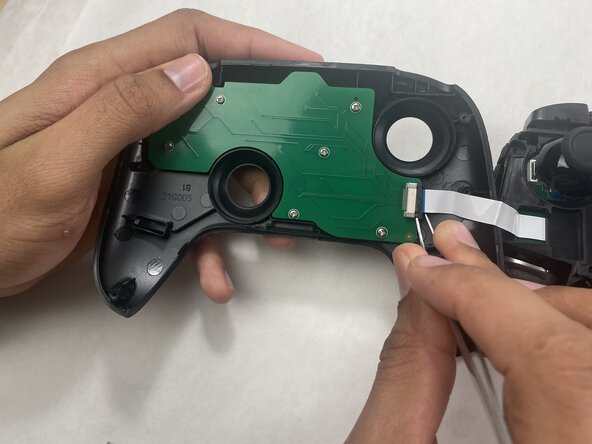
  4. Disassembling 8BitDo Ultimate Wireless Case: 4 단계, 이미지 3개 중 1개 Disassembling 8BitDo Ultimate Wireless Case: 4 단계, 이미지 3개 중 2개 Disassembling 8BitDo Ultimate Wireless Case: 4 단계, 이미지 3개 중 3개
    • The ribbon cable is secured with a locking tab connector.

    • Use tweezers to unlock the locking tab on the ribbon cable connector, then gently disconnect the ribbon cable.

    댓글 쓰기

결론

To reassemble your device, follow these instructions in reverse order.

취소: 해당 안내서를 완성하지 않았습니다.

Connor Bassolino

회원 가입일: 03/29/22

24,165 평판

안내서 120개를 작성함

0가이드 댓글

댓글 쓰기

조회 통계:

지난 24시간: 1

지난 7일: 13

지난 30일: 75

전체 시간: 82