주요 콘텐츠로 건너뛰기

Disassembling IBM ThinkPad T42 Lower Bracket

필요한 것

  1. Disassembling IBM ThinkPad T42 Lower Bracket, Bottom cover: 1 단계, 이미지 1개 중 1개
    • Use a Phillips #0 screwdriver to remove the twenty screws on the underside of the T42.

  2. Disassembling IBM ThinkPad T42 Lower Bracket, Rear screws: 2 단계, 이미지 1개 중 1개
    • Remove the four Phillips screws located on either side of the rear of the T42 (there are two on each end.)

  3. Disassembling IBM ThinkPad T42 Lower Bracket, Keyboard and Trackpad: 3 단계, 이미지 1개 중 1개
    • Flip the laptop over and open the screen to access the keyboard and trackpad.

    • The keyboard and trackpad are connected to the motherboard. Before removing the keyboard and trackpad, disconnect both components from the motherboard, as shown in the following step.

    • The bezel and keyboard will be loose, be careful.

  4. Disassembling IBM ThinkPad T42 Lower Bracket: 4 단계, 이미지 2개 중 1개 Disassembling IBM ThinkPad T42 Lower Bracket: 4 단계, 이미지 2개 중 2개
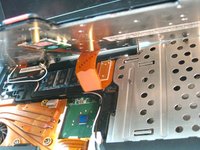
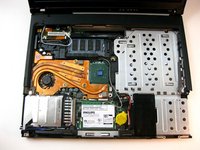
    • Carefully maneuver the palm rest away from the keyboard, as both the keyboard and palm rest/trackpad will come off together.

    • Remember, both the keyboard and trackpad have connectors to the motherboard. Disconnect these before completely removing either component.

  5. Disassembling IBM ThinkPad T42 Lower Bracket, Lower Bracket: 5 단계, 이미지 2개 중 1개 Disassembling IBM ThinkPad T42 Lower Bracket, Lower Bracket: 5 단계, 이미지 2개 중 2개
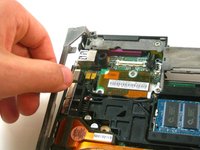
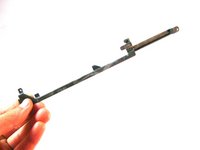
    • Grasp the metal bracket to remove it from the device.

  6. Disassembling IBM ThinkPad T42 Lower Bracket, Microphone cover: 6 단계, 이미지 1개 중 1개
    • Remove the rubber cover from the microphone.

결론

To reassemble your device, follow these instructions in reverse order.

다른 한 분이 해당 안내서를 완성하였습니다.

작성자

8다른 기여자 명과 함께

Gerald Watanabe

회원 가입일: 04/14/10

288 평판

안내서 7개를 작성함

Cal Poly, Team 29-76, Johann Spring 2010 Cal Poly, Team 29-76, Johann Spring 2010 회원

CPSU-JOHANN-S10S29G76

4 회원들

안내서 37개를 작성함

0가이드 댓글

댓글 쓰기

조회 통계:

지난 24시간: 1

지난 7일: 2

지난 30일: 8

전체 시간: 3,634