필요한 것
-
-
First, gather all necessary tools.
-
Remove the back cover to access the battery by pushing the tab on the bottom of the cover.
-
Slide the back cover downwards off of the phone while pressing down on the tab.
 FixBot에 문의하기
-
-
-
Locate the bottom-left corner of the phone where there is a spot to remove the battery.
-
-
-
-
To remove the top of the back cover, pry the sides and pop it off.
-
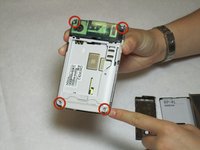
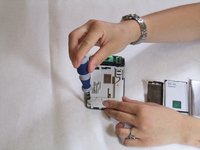
Remove the four screws that secure the front cover to the rest of the phone using a T7 screwdriver.
-
-
-
Once the front cover has been removed, there is nothing holding the keyboard to the rest of the phone. Simply remove the keyboard from the cover by lifting the keyboard from its interior side.
-




To reassemble your device, follow these instructions in reverse order.

팀

Cal Poly, Team 9-63, Walters Spring 2011 Cal Poly, Team 9-63, Walters Spring 2011 회원
CPSU-WALTERS-S11S9G63
5 회원들
안내서 12개를 작성함
