주요 콘텐츠로 건너뛰기
수리 커뮤니티 가입 - 계정 만들기

Eightarc Fusion Joystick Replacement

조회수: 1.6천

통계 보기:

지난 24시간
1
지난 7일:
14
지난 30일:
97
전체 시간:
1,578
댓글: 0

해당 안내서에 댓글을 남긴 사람이 없습니다. 첫 번째가 되시겠습니까?

Go to guide comments
완료함: 1

1명이 이 안내서를 "완료"로 표시했습니다. 다음은 귀하의 차례입니까?

즐겨찾기: 0

해당 안내서에 좋아요를 누르고 구독한 사람이 아직 없습니다. 첫 번째 주인공이 되시겠습니까?

소요 시간: 10 - 15 분
난이도: 쉬움
잘게 썰기

해당 안내서의 단계들은 분할되어 전제 조건 안내서들로 만들어져야 합니다.

Eightarc Fusion Joystick Replacement

This guide shows how to remove and disassemble the joystick from the controller. This will allow the user to clean under the joystick or replace it.

Warning: Use caution when placing the joystick face down on the table. The joystick can crack if placed down too hard. Be sure to gently turn the device over and place it face down. It can be helpful to balance the other side of the device to distribute the weight.

필요한 것

도구

    1. Eightarc Fusion Joystick Replacement, Joystick: 1 단계, 이미지 2개 중 1개 Eightarc Fusion Joystick Replacement, Joystick: 1 단계, 이미지 2개 중 2개
      • Because of the protruding joystick on the top of the controller, make sure to work on a soft surface or prop the controller up to avoid stress on the joystick.

      • Place the controller face down (buttons and joystick down).

      • Use a Phillips Head #1 screwdriver to remove the eight 9.65mm screws located on the felt and metal backplate.

      • Do not confuse the four screws in the rubber feet with the eight screws in the felt. The screws in the feet do not need to be removed.

      댓글 쓰기

    2. Eightarc Fusion Joystick Replacement: 2 단계, 이미지 1개 중 1개
      • Open the door for the cord storage compartment on the right side of the device.

      • Reach under the panel and push upwards on the back panel. Lift it up and remove it from the device.

      댓글 쓰기

    3. Eightarc Fusion Joystick Replacement: 3 단계, 이미지 2개 중 1개 Eightarc Fusion Joystick Replacement: 3 단계, 이미지 2개 중 2개
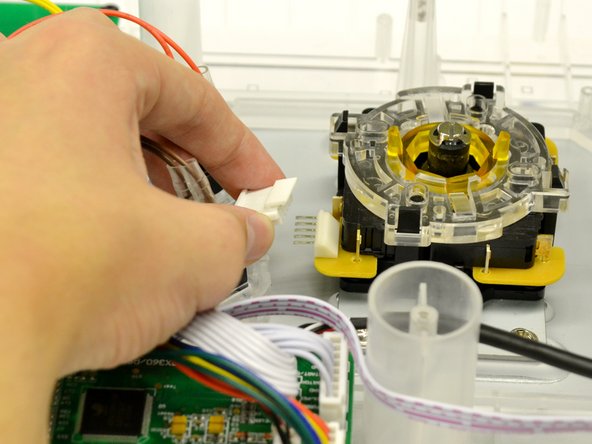
      • Use the large plastic opening tool to softly pry the lip on the white 5 pin connector to relieve pressure while pulling the 5 pin connector.

      • Remove the white connector from the microswitch assembly.

      댓글 쓰기

    4. Eightarc Fusion Joystick Replacement: 4 단계, 이미지 2개 중 1개 Eightarc Fusion Joystick Replacement: 4 단계, 이미지 2개 중 2개
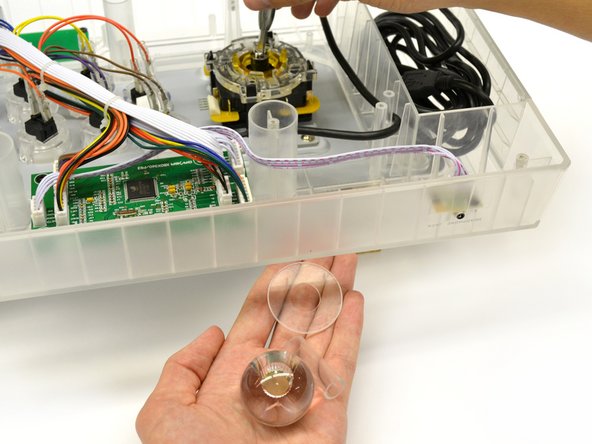
      • Insert a #4 Flat Head screwdriver into the shaft of the joystick and grasp the ball topper with your other hand.

      • Turn the flat head screwdriver counter clockwise for a quarter turn while tightly holding the ball topper.

      • The ball topper should now be loose enough to unscrew by hand.

      • Set aside the shaft cover, dust cover, and ball topper.

      댓글 쓰기

    5. Eightarc Fusion Joystick Replacement: 5 단계, 이미지 2개 중 1개 Eightarc Fusion Joystick Replacement: 5 단계, 이미지 2개 중 2개
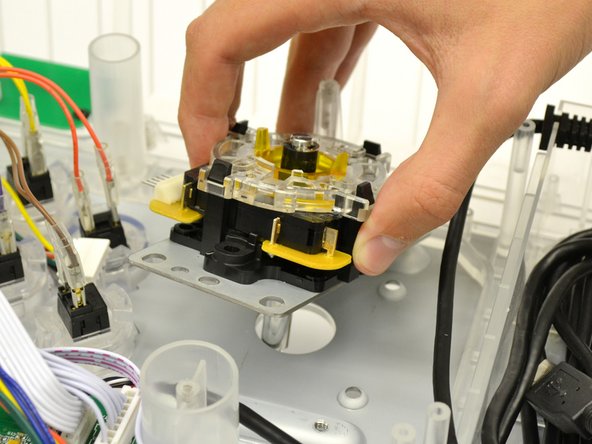
      • Remove the four 8.35 mm screws from the mounting plate of the joystick using a Phillips Head #2 screwdriver.

      • Remove the joystick assembly from the controller.

      댓글 쓰기

    6. Eightarc Fusion Joystick Replacement: 6 단계, 이미지 3개 중 1개 Eightarc Fusion Joystick Replacement: 6 단계, 이미지 3개 중 2개 Eightarc Fusion Joystick Replacement: 6 단계, 이미지 3개 중 3개
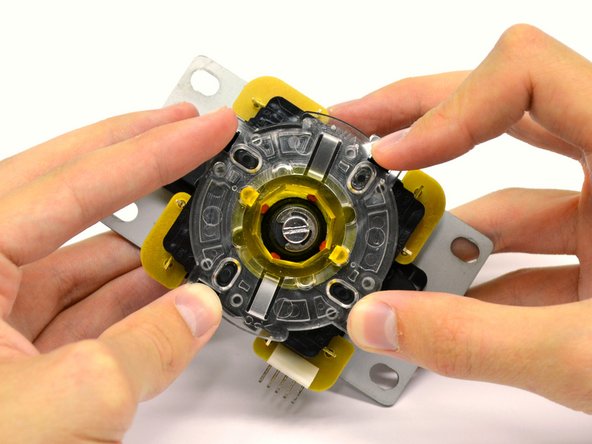
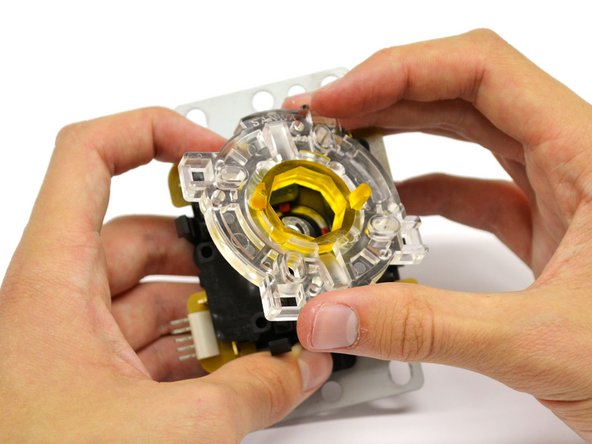
      • Place joystick assembly on a hard, flat surface.

      • Gently press on the four black tabs on each side of the assembly.

      • With the tabs depressed, lift the clear restrictor plate from the assembly.

      댓글 쓰기

    7. Eightarc Fusion Joystick Replacement: 7 단계, 이미지 1개 중 1개
      • Remove the switch housing from the assembly by lifting straight up.

      • The joystick assembly is now ready to be replaced or cleaned.

      댓글 쓰기

결론

To reassemble your device, follow these instructions in reverse order.

취소: 해당 안내서를 완성하지 않았습니다.

다른 한 분이 해당 안내서를 완성하였습니다.

작성자

4다른 기여자 명과 함께

Austin

회원 가입일: 01/28/15

245 평판

안내서 2개를 작성함

팀

Cal Poly, Team 17-35, Amido Winter 2015 Cal Poly, Team 17-35, Amido Winter 2015 회원

CPSU-AMIDO-W15S17G35

4 회원들

안내서 60개를 작성함

0가이드 댓글

댓글 쓰기

조회 통계:

지난 24시간: 1

지난 7일: 14

지난 30일: 97

전체 시간: 1,578