주요 콘텐츠로 건너뛰기

Flashforge Finder 2 Fan Cleaning or Replacement

필요한 것

  1. Flashforge Finder 2 Fan Cleaning or Replacement, Work safely: 1 단계, 이미지 1개 중 1개
    • Shut down the back switch and disconnect the printer power supply

    • If used recently wait for the extruder to cool down

  2. Flashforge Finder 2 Fan Cleaning or Replacement, Remove extruder cover: 2 단계, 이미지 3개 중 1개 Flashforge Finder 2 Fan Cleaning or Replacement, Remove extruder cover: 2 단계, 이미지 3개 중 2개 Flashforge Finder 2 Fan Cleaning or Replacement, Remove extruder cover: 2 단계, 이미지 3개 중 3개
    • Remove the three screws on the extruder top with a 2.5 Allen key or an appropriate screwdriver bit

    • Gently lift up the extruder cover

    • Pay attention to the flat cable while lifting the cover

  3. Flashforge Finder 2 Fan Cleaning or Replacement, Disconnect the fan: 3 단계, 이미지 1개 중 1개
    • Using a spudger, disconnect the fan connector

    • Route the cable to free it

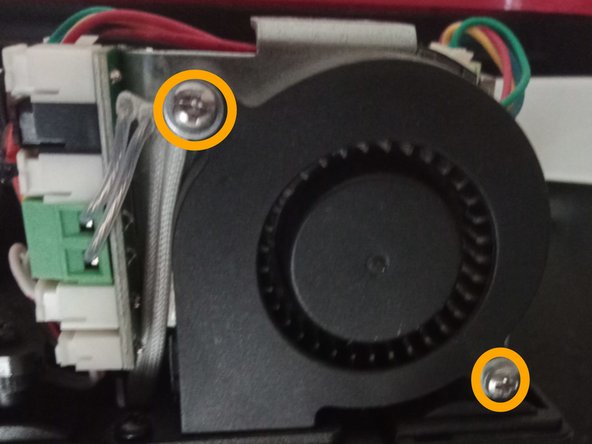
  4. Flashforge Finder 2 Fan Cleaning or Replacement, Unscrew the fan: 4 단계, 이미지 2개 중 1개 Flashforge Finder 2 Fan Cleaning or Replacement, Unscrew the fan: 4 단계, 이미지 2개 중 2개
    • Remove the two Phillips screw holding the fan

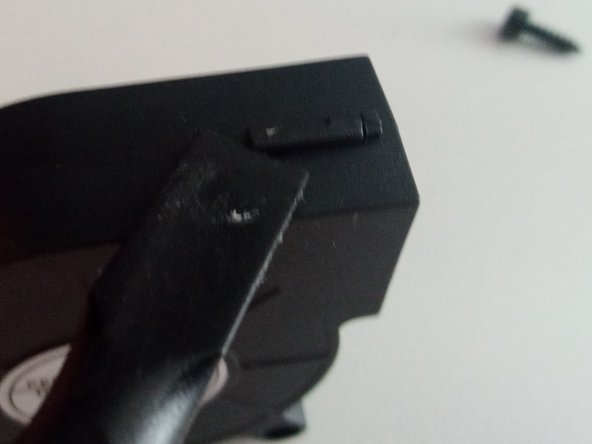
  5. Flashforge Finder 2 Fan Cleaning or Replacement, (Optional) Disassemble the fan: 5 단계, 이미지 2개 중 1개 Flashforge Finder 2 Fan Cleaning or Replacement, (Optional) Disassemble the fan: 5 단계, 이미지 2개 중 2개
    • The fan can now be removed from the extruder. If you need to replace it, just follow the steps in reverse order with the new fan

    • If you are cleaning the fan, release the three clips holding it together with a spudger

  6. Flashforge Finder 2 Fan Cleaning or Replacement, Clean the fan: 6 단계, 이미지 1개 중 1개
    • Using compressed air and a brush, clean the fan from dust and debris

결론

To reassemble your device, follow these instructions in reverse order.

작성자

1다른 기여자 명과 함께

dinoo_fixit

회원 가입일: 03/22/22

1,706 평판

안내서 4개를 작성함

0가이드 댓글

댓글 쓰기

조회 통계:

지난 24시간: 0

지난 7일: 4

지난 30일: 15

전체 시간: 228