주요 콘텐츠로 건너뛰기

FujiFilm FinePix A340 LCD Screen Replacement

필요한 것

  1. FujiFilm FinePix A340 LCD Screen Replacement, Outer Case: 1 단계, 이미지 1개 중 1개
    • To prevent the danger of electric shock, remove the batteries before continuing to the next steps.

    • Slide the battery cover to the side to release the batteries.

  2. FujiFilm FinePix A340 LCD Screen Replacement: 2 단계, 이미지 3개 중 1개 FujiFilm FinePix A340 LCD Screen Replacement: 2 단계, 이미지 3개 중 2개 FujiFilm FinePix A340 LCD Screen Replacement: 2 단계, 이미지 3개 중 3개
    • Remove the five screws from the camera casing using a tri-point Y0 screwdriver.

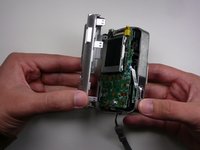
  3. FujiFilm FinePix A340 LCD Screen Replacement: 3 단계, 이미지 2개 중 1개 FujiFilm FinePix A340 LCD Screen Replacement: 3 단계, 이미지 2개 중 2개
    • Grab the case with your hands and slowly pull back the outer casing.

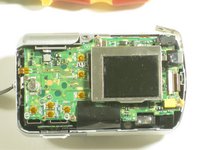
  4. FujiFilm FinePix A340 LCD Screen Replacement, LCD Screen: 4 단계, 이미지 1개 중 1개
    • Locate the LCD screen and anchoring screw.

    • Remove screw.

  5. FujiFilm FinePix A340 LCD Screen Replacement: 5 단계, 이미지 1개 중 1개
    • Carefully pull the LCD screen away from the board it is connected to.

  6. FujiFilm FinePix A340 LCD Screen Replacement: 6 단계, 이미지 1개 중 1개
    • Push both blue switches away from the holding device to detach the LCD ribbon.

    • Be careful when removing the ribbon. If you damage it, you will need to replace it as well.

  7. FujiFilm FinePix A340 LCD Screen Replacement: 7 단계, 이미지 1개 중 1개
    • Carefully detach the ribbon from where it was connected by the blue pins.

  8. FujiFilm FinePix A340 LCD Screen Replacement: 8 단계, 이미지 1개 중 1개
    • Now that everything has been disconnected from the board, remove LCD screen.

결론

To reassemble your device, follow these instructions in reverse order.

작성자

6다른 기여자 명과 함께

Cody

회원 가입일: 04/18/10

47 평판

안내서 4개를 작성함

Cal Poly, Team 7-11, Maness Spring 2010 Cal Poly, Team 7-11, Maness Spring 2010 회원

CPSU-MANESS-S10S7G11

3 회원들

안내서 4개를 작성함

0가이드 댓글

댓글 쓰기

조회 통계:

지난 24시간: 0

지난 7일: 3

지난 30일: 12

전체 시간: 6,245