주요 콘텐츠로 건너뛰기

Fujifilm FinePix S4200 LCD Screen Replacement

필요한 것

  1. Fujifilm FinePix S4200 LCD Screen Replacement, LCD Screen: 1 단계, 이미지 1개 중 1개
    • Turn the camera off.

    • Turn the camera upside down so that the battery compartment is showing.

  2. Fujifilm FinePix S4200 LCD Screen Replacement: 2 단계, 이미지 1개 중 1개
    • Remove the three 4 mm screws from the bottom of the camera with a Phillips #000 screwdriver.

  3. Fujifilm FinePix S4200 LCD Screen Replacement: 3 단계, 이미지 1개 중 1개
    • Rotate camera to the side where the speaker ports are located.

    • Remove the three 4 mm screws with a Phillips #000 screwdriver.

  4. Fujifilm FinePix S4200 LCD Screen Replacement: 4 단계, 이미지 1개 중 1개
    • Turn the camera to the opposite side where the HDMI port is located.

    • Remove all five 4 mm screws with a Phillips #000 screwdriver.

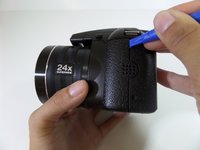
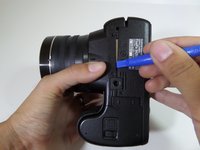
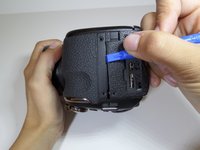
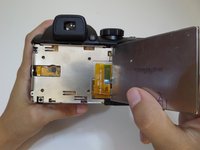
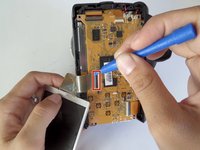
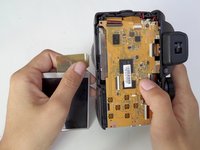
  5. Fujifilm FinePix S4200 LCD Screen Replacement: 5 단계, 이미지 3개 중 1개 Fujifilm FinePix S4200 LCD Screen Replacement: 5 단계, 이미지 3개 중 2개 Fujifilm FinePix S4200 LCD Screen Replacement: 5 단계, 이미지 3개 중 3개
    • Casing is fragile.

    • Utilize the plastic opening tool to pry in between the back casing of the camera from the front casing.

    • Continue this motion around the camera to create a wedge between the front and back casing of the camera.

  6. Fujifilm FinePix S4200 LCD Screen Replacement: 6 단계, 이미지 1개 중 1개
    • Use force to pull apart the back casing from the camera.

  7. Fujifilm FinePix S4200 LCD Screen Replacement: 7 단계, 이미지 1개 중 1개
    • Remove the two 4 mm screws that hold the motherboard and metal plate in place.

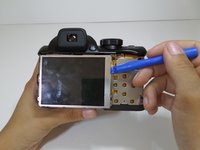
  8. Fujifilm FinePix S4200 LCD Screen Replacement: 8 단계, 이미지 2개 중 1개 Fujifilm FinePix S4200 LCD Screen Replacement: 8 단계, 이미지 2개 중 2개
    • Utilize the plastic opening tool to gently lift the LCD screen away from the metal plate.

    • Flip over LCD screen so that the left side of the metal plate is visible.

  9. Fujifilm FinePix S4200 LCD Screen Replacement: 9 단계, 이미지 1개 중 1개
    • Rotate the camera vertically so that it is easier to manage.

    • Use a Phillips #000 screwdriver to remove the two 4mm screws that are located on the metal plate under the LCD screen.

  10. Fujifilm FinePix S4200 LCD Screen Replacement: 10 단계, 이미지 1개 중 1개
    • Detach the metal plate from the motherboard.

  11. Fujifilm FinePix S4200 LCD Screen Replacement: 11 단계, 이미지 2개 중 1개 Fujifilm FinePix S4200 LCD Screen Replacement: 11 단계, 이미지 2개 중 2개
    • The orange ribbon cable is fragile.

    • Pull back the small black latch connecting the orange ribbon cable to the motherboard.

    • Gently remove the LCD screen from the motherboard.

결론

To reassemble your device, follow these instructions in reverse order.

다른 3명이 해당 안내서를 완성하였습니다.

작성자

6다른 기여자 명과 함께

Jackie Acevedo

회원 가입일: 09/14/15

340 평판

안내서 2개를 작성함

CSU Fullerton, Team 1-4, Bruce Fall 2015 CSU Fullerton, Team 1-4, Bruce Fall 2015 회원

CSUF-BRUCE-F15S1G4

4 회원들

안내서 7개를 작성함

1가이드 댓글

Ou peut on trouver cet écran ?

lise.didion - 답글

댓글 쓰기

조회 통계:

지난 24시간: 1

지난 7일: 2

지난 30일: 9

전체 시간: 1,864