주요 콘텐츠로 건너뛰기

Game Boy Pocket LCD Screen Replacement

필요한 것

  1. Game Boy Pocket LCD Screen Replacement, Remove the external screws: 1 단계, 이미지 3개 중 1개 Game Boy Pocket LCD Screen Replacement, Remove the external screws: 1 단계, 이미지 3개 중 2개 Game Boy Pocket LCD Screen Replacement, Remove the external screws: 1 단계, 이미지 3개 중 3개
    • Place the Game Boy Pocket face-down on a clean, flat surface.

    • Remove batteries from battery compartment.

    • Use a Y1 tri-wing screwdriver and turn counterclockwise to remove the four external screws.

    • Use a Y1 tri-wing screwdriver and turn counterclockwise to remove the two screws inside the battery compartment.

  2. Game Boy Pocket LCD Screen Replacement, Open the device: 2 단계, 이미지 3개 중 1개 Game Boy Pocket LCD Screen Replacement, Open the device: 2 단계, 이미지 3개 중 2개 Game Boy Pocket LCD Screen Replacement, Open the device: 2 단계, 이미지 3개 중 3개
    • Place your hands on the front and back covers of the Game Boy Pocket, and carefully separate the device.

    • Set the back cover aside. You will need it to reassemble the device.

  3. Game Boy Pocket LCD Screen Replacement, Remove the motherboard screws: 3 단계, 이미지 1개 중 1개
    • Use a Phillips #1 screwdriver and turn counterclockwise to remove the three screws on the motherboard.

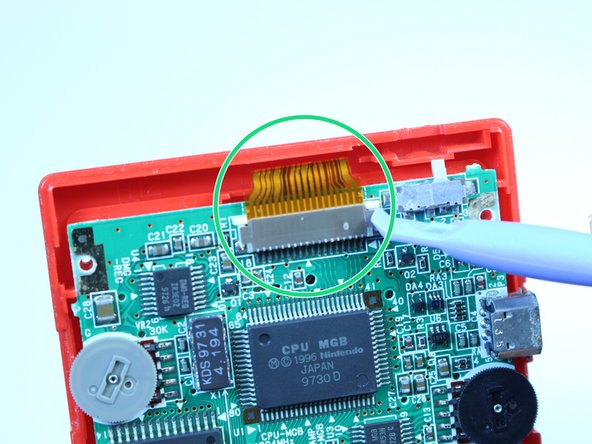
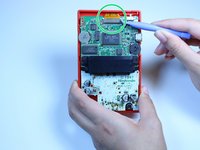
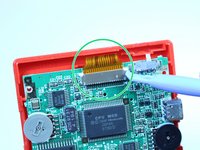
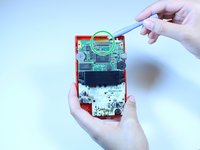
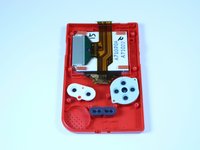
  4. Game Boy Pocket LCD Screen Replacement, Remove the clip securing the ribbon cable: 4 단계, 이미지 3개 중 1개 Game Boy Pocket LCD Screen Replacement, Remove the clip securing the ribbon cable: 4 단계, 이미지 3개 중 2개 Game Boy Pocket LCD Screen Replacement, Remove the clip securing the ribbon cable: 4 단계, 이미지 3개 중 3개
    • Use a plastic opening tool to dislodge and remove the clip securing the ribbon cable.

    • Make sure you apply pressure on both sides of the clip to loosen it.

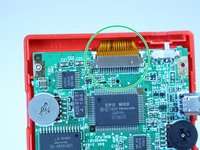
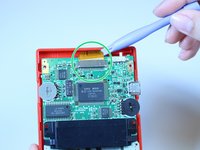
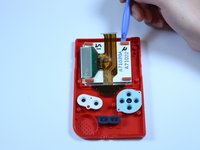
  5. Game Boy Pocket LCD Screen Replacement, Dislodge the ribbon cable: 5 단계, 이미지 2개 중 1개 Game Boy Pocket LCD Screen Replacement, Dislodge the ribbon cable: 5 단계, 이미지 2개 중 2개
    • Use a plastic opening tool to dislodge the ribbon cable.

    • Be gentle to prevent tearing the ribbon.

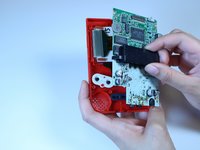
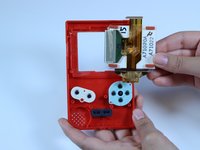
  6. Game Boy Pocket LCD Screen Replacement, Remove the motherboard: 6 단계, 이미지 3개 중 1개 Game Boy Pocket LCD Screen Replacement, Remove the motherboard: 6 단계, 이미지 3개 중 2개 Game Boy Pocket LCD Screen Replacement, Remove the motherboard: 6 단계, 이미지 3개 중 3개
    • Grab the black piece protruding from the motherboard, and lift up to remove the motherboard.

    • Set the motherboard aside. You will need it to reassemble the device.

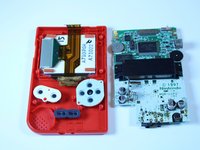
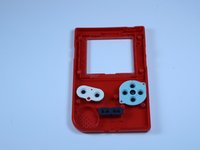
  7. Game Boy Pocket LCD Screen Replacement, Remove the LCD screen: 7 단계, 이미지 3개 중 1개 Game Boy Pocket LCD Screen Replacement, Remove the LCD screen: 7 단계, 이미지 3개 중 2개 Game Boy Pocket LCD Screen Replacement, Remove the LCD screen: 7 단계, 이미지 3개 중 3개
    • Use a plastic opening tool to lift the LCD screen away from the front cover.

    • Use your fingers to remove the LCD screen.

결론

To reassemble your device, follow these instructions in reverse order.

다른 19명이 해당 안내서를 완성하였습니다.

작성자

5다른 기여자 명과 함께

Adriana Rahrig

회원 가입일: 10/07/14

1,637 평판

안내서 5개를 작성함

USF Tampa, Team 1-1, Leahy Fall 2014 USF Tampa, Team 1-1, Leahy Fall 2014 회원

USFT-LEAHY-F14S1G1

4 회원들

안내서 19개를 작성함

3가이드 댓글

please can anyone give me a website that sells replacemtn screens for the Gameboy pocket?

help please - 답글

There's no website that sells replacement screens the only way to get one is to order another Gameboy off of eBay and take out the screen

Isaac fraser -

I get mine from Handheld Legend. They have all the Gameboy parts you could ever want.

Chris Pavlik -

댓글 쓰기

조회 통계:

지난 24시간: 13

지난 7일: 75

지난 30일: 371

전체 시간: 31,361