소개
If you find yourself on this guide, it means you are experiencing abnormal functioning of your device. This could mean that it is shutting off unexpectedly or it is taking a long time to restart once powered down. This guide will take you through the steps of replacing the motherboard. But first, you will have to remove the touch screen in order to get to the motherboard ( steps are attached for touch display removal).
필요한 것
-
-
Microwave the iOpener for about 30 seconds. Then place it on top of the screen, and let it sit for about 2 minutes.
-
Repeat this process a second to ensure that the glue is becoming loose.
-
Alternative: Use a heat gun or hair dryer to heat up the glue
-
-
-
이 단계에 사용된 도구:Tweezers$3.99
-
Remove brown copper tape with the FPC (not clipped). Removing of the copper tape is necessary, I didn't find a way to avoid it. Try to remove the copper tape as gentle as possible to reuse it.
-
Also remove green tape with angled tweezers and unclip in a 2nd step the FPC from the board
-


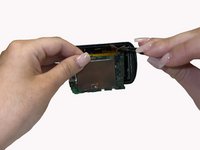
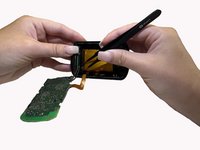
To reassemble your device, follow these instructions in reverse order.



팀

University of Alabama, Team 3-2, Bedsole Spring 2022 University of Alabama, Team 3-2, Bedsole Spring 2022 회원
UA-BEDSOLE-S22S3G2
4 회원들
안내서 13개를 작성함
1가이드 댓글
Hi, i have an issue with Garmin Edsge 830; the problem is that the device cant connect to the phone and the official statemenet from Garmin was that the bluetooth sensor is not working. Is there a way to reapir it? i guess it is soldered on the motherboard, meaning i should change the whole motherboard?
Thanks for the answer
