주요 콘텐츠로 건너뛰기
수리 커뮤니티 가입 - 계정 만들기

Gateway 3545GZ Internet Card Replacement

필요한 것

  1. Gateway 3545GZ Internet Card Replacement, Internet Card: 1 단계, 이미지 1개 중 1개
    • Flip your laptop over and locate the sticker indicating where the internet card is.

    • Using a PH1 Phillips-Head screwdriver, carefully unscrew the screw holding the flap down

    • The screw length is 3mm

  2. Gateway 3545GZ Internet Card Replacement: 2 단계, 이미지 1개 중 1개
    • Carefully remove the flap over the internet card.

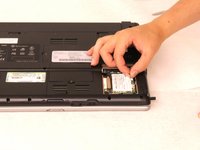
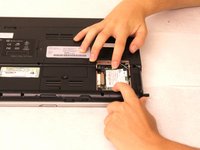
  3. Gateway 3545GZ Internet Card Replacement: 3 단계, 이미지 2개 중 1개 Gateway 3545GZ Internet Card Replacement: 3 단계, 이미지 2개 중 2개
    • Unhook the two cords attached to the internet card and remove the card.

    • Next, pull the two metal hooks holding the card in place away from each other.

    • The card should pop out and just take it out from the dock.

결론

To reassemble your device, follow these instructions in reverse order.

작성자

3다른 기여자 명과 함께

Baylee Harding

회원 가입일: 09/12/16

25 평판

안내서 1개를 작성함

0가이드 댓글

댓글 쓰기

조회 통계:

지난 24시간: 0

지난 7일: 3

지난 30일: 13

전체 시간: 398