소개
Following this guide will help you remove and replace the battery in your HP 15-db0015dx.
Reasons for battery replacement:
- Computer won’t turn on without being plugged in.
- Battery doesn’t seem to hold a charge.
Replacing the battery will alleviate these issues and lengthen the lifespan of your laptop.
필요한 것
-
-
Power off the device before starting.
-
Remove the rubber strips that hide the screws using the spudger.
-
Flip the device and unscrew the eleven screws with a Phillips #0 screwdriver.
-
-


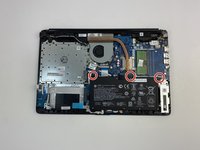
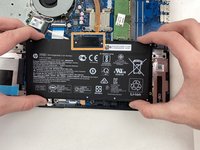
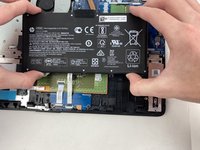
To reassemble your device, follow these instructions in reverse order.
다른 8명이 해당 안내서를 완성하였습니다.


팀

Embry-Riddle Aeronautical University, Team S2-G5, Watkins Spring 2020 Embry-Riddle Aeronautical University, Team S2-G5, Watkins Spring 2020 회원
ERAU-WATKINS-S20S2G5
5 회원들
안내서 9개를 작성함
1가이드 댓글
Dobrej schanim zakladovou desku na HP Pavilion 15-db005dx Palmrest ,
Mohli bysta mi poradit kde ji koupim predem dekuji za odpoved.
