주요 콘텐츠로 건너뛰기

HP 15-db0015dx USB/SD Card Reader Replacement

필요한 것

  1. HP 15-db0015dx USB/SD Card Reader Replacement, Battery: 1 단계, 이미지 2개 중 1개 HP 15-db0015dx USB/SD Card Reader Replacement, Battery: 1 단계, 이미지 2개 중 2개
    • Power off the device before starting.

    • Remove the rubber strips that hide the screws using the spudger.

    • Flip the device and unscrew the eleven screws with a Phillips #0 screwdriver.

  2. HP 15-db0015dx USB/SD Card Reader Replacement: 2 단계, 이미지 3개 중 1개 HP 15-db0015dx USB/SD Card Reader Replacement: 2 단계, 이미지 3개 중 2개 HP 15-db0015dx USB/SD Card Reader Replacement: 2 단계, 이미지 3개 중 3개
    • Use the spudger tool to pry open the back cover.

    • Lift the back panel to access the inside.

    • Slide the CD drive to the left, and remove.

  3. HP 15-db0015dx USB/SD Card Reader Replacement: 3 단계, 이미지 3개 중 1개 HP 15-db0015dx USB/SD Card Reader Replacement: 3 단계, 이미지 3개 중 2개 HP 15-db0015dx USB/SD Card Reader Replacement: 3 단계, 이미지 3개 중 3개
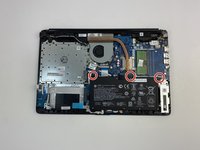
    • Unscrew the three battery screws with a Phillips #0 screwdriver.

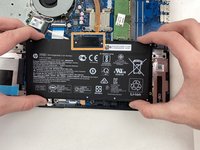
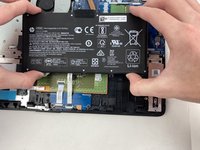
    • Lift the battery up, disconnecting the connector first.

    • Push forward and remove the battery.

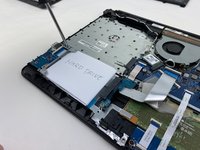
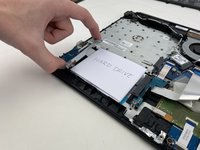
  4. HP 15-db0015dx USB/SD Card Reader Replacement, Hard Drive: 4 단계, 이미지 3개 중 1개 HP 15-db0015dx USB/SD Card Reader Replacement, Hard Drive: 4 단계, 이미지 3개 중 2개 HP 15-db0015dx USB/SD Card Reader Replacement, Hard Drive: 4 단계, 이미지 3개 중 3개
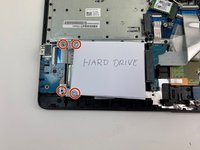
    • Remove the four screws on the hard drive bracket with a Phillips #0 screwdriver.

    • Pull the hard drive bracket out.

  5. HP 15-db0015dx USB/SD Card Reader Replacement: 5 단계, 이미지 1개 중 1개
    • Remove the hard drive from the connector by sliding it to the left until the connector is disengaged.

  6. HP 15-db0015dx USB/SD Card Reader Replacement, USB/SD Card Reader: 6 단계, 이미지 3개 중 1개 HP 15-db0015dx USB/SD Card Reader Replacement, USB/SD Card Reader: 6 단계, 이미지 3개 중 2개 HP 15-db0015dx USB/SD Card Reader Replacement, USB/SD Card Reader: 6 단계, 이미지 3개 중 3개
    • Lift up on the connector pin that attaches the SD card reader to the motherboard

    • Gently pull the wire out

  7. HP 15-db0015dx USB/SD Card Reader Replacement: 7 단계, 이미지 2개 중 1개 HP 15-db0015dx USB/SD Card Reader Replacement: 7 단계, 이미지 2개 중 2개
    • Snake the wire underneath the battery support

    • Pull the wire out to allow the SD Card reader to be removed

  8. HP 15-db0015dx USB/SD Card Reader Replacement: 8 단계, 이미지 3개 중 1개 HP 15-db0015dx USB/SD Card Reader Replacement: 8 단계, 이미지 3개 중 2개 HP 15-db0015dx USB/SD Card Reader Replacement: 8 단계, 이미지 3개 중 3개
    • Remove the two Phillips #0 screws holding the SD Card reader in place.

    • Gently pull the SD card reader up and out of the slot.

    • A spudger may have to be used to pop the SD card reader out of place.

결론

To reassemble your device, follow these instructions in reverse order.

0가이드 댓글

댓글 쓰기

조회 통계:

지난 24시간: 1

지난 7일: 6

지난 30일: 11

전체 시간: 655