주요 콘텐츠로 건너뛰기

HP 550 notebook LCD display Replacement

필요한 것

  1. HP 550 notebook LCD display Replacement, LCD display: 1 단계, 이미지 1개 중 1개
    • Rimuovere batteria

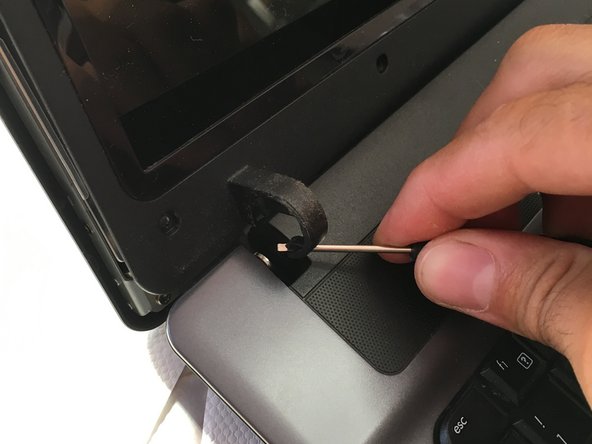
  2. HP 550 notebook LCD display Replacement: 2 단계, 이미지 3개 중 1개 HP 550 notebook LCD display Replacement: 2 단계, 이미지 3개 중 2개 HP 550 notebook LCD display Replacement: 2 단계, 이미지 3개 중 3개
    • rimuovere gli 8 gommi e le viti sottostanti

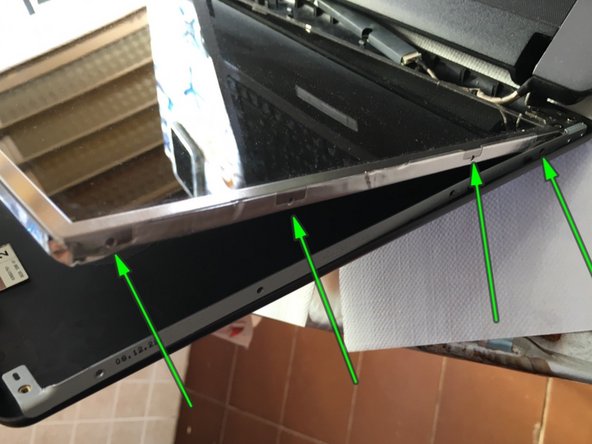
  3. HP 550 notebook LCD display Replacement: 3 단계, 이미지 3개 중 1개 HP 550 notebook LCD display Replacement: 3 단계, 이미지 3개 중 2개 HP 550 notebook LCD display Replacement: 3 단계, 이미지 3개 중 3개
    • aiutarsi con uno strumento sottile per separare la cornice lcd

    • Sganciare la cover sulle 2 cerniere nel lato superiore

  4. HP 550 notebook LCD display Replacement: 4 단계, 이미지 3개 중 1개 HP 550 notebook LCD display Replacement: 4 단계, 이미지 3개 중 2개 HP 550 notebook LCD display Replacement: 4 단계, 이미지 3개 중 3개
    • Rimuovere cover lcd con delicatezza facendo attenzione ai fili e staccando eventuali adesivi se presenti

    • Rimuovere 4 viti fissaggio lcd da un lato e le 4 viti dall'altro

    • Forzare un po la cover posteriore per accedere all'ultima vite di entrambi i lati

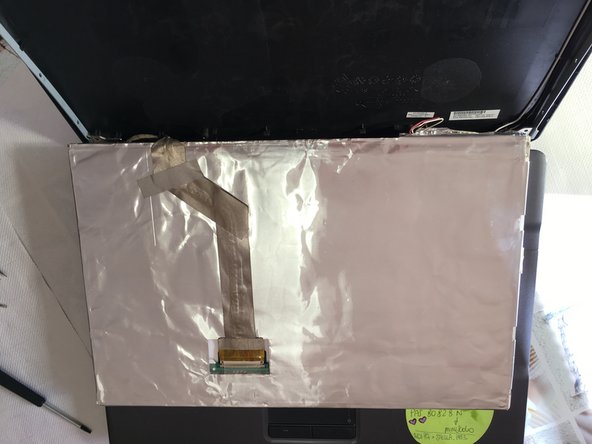
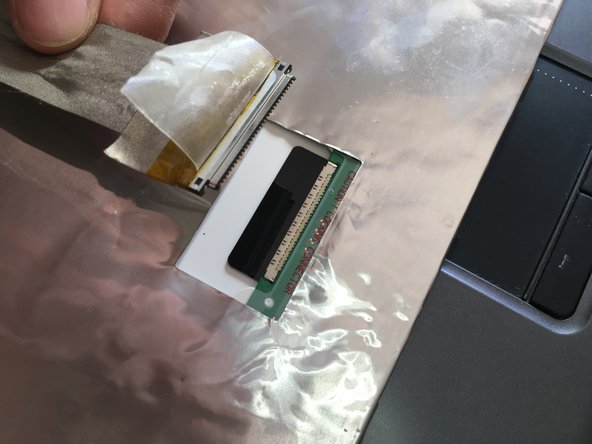
  5. HP 550 notebook LCD display Replacement: 5 단계, 이미지 3개 중 1개 HP 550 notebook LCD display Replacement: 5 단계, 이미지 3개 중 2개 HP 550 notebook LCD display Replacement: 5 단계, 이미지 3개 중 3개
    • Sganciare connettore pannello lcd

    • Appoggiare delicatamente il pannello LCD sulla tastiera

    • Sganciare connettore video display

  6. HP 550 notebook LCD display Replacement: 6 단계, 이미지 1개 중 1개
    • Rimuovere pannello LCD e sostituire con il nuovo

결론

Per rimontare il dispositivo, segui queste istruzioni in ordine inverso.

다른 3명이 해당 안내서를 완성하였습니다.

작성자

1다른 기여자 명과 함께

Smilzo

회원 가입일: 11/09/13

12,083 평판

안내서 39개를 작성함

2가이드 댓글

what are those two things on top labeled 1 and 2 in the last picture?

Vladut Prcsina - 답글

Non ho capito la domanda. Grazie

Smilzo -

댓글 쓰기

조회 통계:

지난 24시간: 2

지난 7일: 8

지난 30일: 19

전체 시간: 2,689