주요 콘텐츠로 건너뛰기

HP ENVY 6055e Input Tray Replacement

필요한 것

  1. HP ENVY 6055e Input Tray Replacement, Input Tray: 1 단계, 이미지 3개 중 1개 HP ENVY 6055e Input Tray Replacement, Input Tray: 1 단계, 이미지 3개 중 2개 HP ENVY 6055e Input Tray Replacement, Input Tray: 1 단계, 이미지 3개 중 3개
    • Flip the printer upside down.

  2. HP ENVY 6055e Input Tray Replacement: 2 단계, 이미지 2개 중 1개 HP ENVY 6055e Input Tray Replacement: 2 단계, 이미지 2개 중 2개
    • Slide the input tray open.

  3. HP ENVY 6055e Input Tray Replacement: 3 단계, 이미지 1개 중 1개
    • Remove the six T3 Torx screws.

  4. HP ENVY 6055e Input Tray Replacement: 4 단계, 이미지 2개 중 1개 HP ENVY 6055e Input Tray Replacement: 4 단계, 이미지 2개 중 2개
    • Remove the right piece by lifting it up.

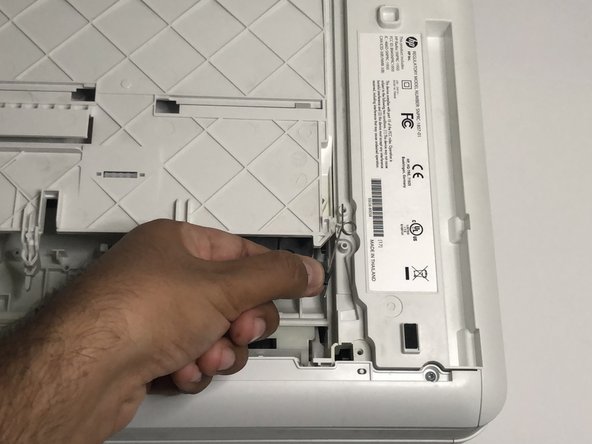
  5. HP ENVY 6055e Input Tray Replacement: 5 단계, 이미지 3개 중 1개 HP ENVY 6055e Input Tray Replacement: 5 단계, 이미지 3개 중 2개 HP ENVY 6055e Input Tray Replacement: 5 단계, 이미지 3개 중 3개
    • Remove the left piece by lifting it with both hands.

    • The left piece has a small hook in the middle, so be careful not to break it.

  6. HP ENVY 6055e Input Tray Replacement: 6 단계, 이미지 1개 중 1개
    • Locate two springs that are in the lower part of the printer.

  7. HP ENVY 6055e Input Tray Replacement: 7 단계, 이미지 3개 중 1개 HP ENVY 6055e Input Tray Replacement: 7 단계, 이미지 3개 중 2개 HP ENVY 6055e Input Tray Replacement: 7 단계, 이미지 3개 중 3개
    • Remove the right spring by lifting from the black plastic piece.

    • Make sure the input tray is in the original closed place when putting back this piece.

  8. HP ENVY 6055e Input Tray Replacement: 8 단계, 이미지 3개 중 1개 HP ENVY 6055e Input Tray Replacement: 8 단계, 이미지 3개 중 2개 HP ENVY 6055e Input Tray Replacement: 8 단계, 이미지 3개 중 3개
    • Remove the left spring by lifting from the black plastic piece.

    • Make sure the input tray is in the original closed place when putting back this piece.

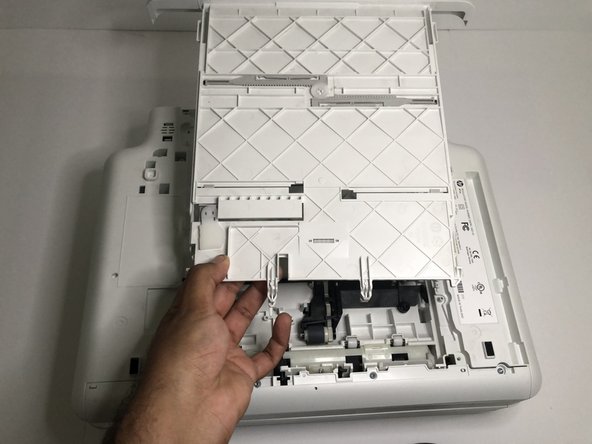
  9. HP ENVY 6055e Input Tray Replacement: 9 단계, 이미지 3개 중 1개 HP ENVY 6055e Input Tray Replacement: 9 단계, 이미지 3개 중 2개 HP ENVY 6055e Input Tray Replacement: 9 단계, 이미지 3개 중 3개
    • Remove the defective input tray.

결론

To reassemble your device, follow these instructions in reverse order.

다른 4명이 해당 안내서를 완성하였습니다.

작성자

2다른 기여자 명과 함께

Brian Mojica

회원 가입일: 08/29/22

250 평판

안내서 1개를 작성함

CSU Los Angeles, Team 3-69, Briggs Fall 2022 CSU Los Angeles, Team 3-69, Briggs Fall 2022 회원

CSULA-BRIGGS-F22S3G69

1 회원

안내서 3개를 작성함

0가이드 댓글

댓글 쓰기

조회 통계:

지난 24시간: 1

지난 7일: 32

지난 30일: 138

전체 시간: 2,530