주요 콘텐츠로 건너뛰기

HP Elitebook x360 1040 G5 Screen display Replacement

필요한 것

  1. HP Elitebook x360 1040 G5 Screen display Replacement, Screen display: 1 단계, 이미지 3개 중 1개 HP Elitebook x360 1040 G5 Screen display Replacement, Screen display: 1 단계, 이미지 3개 중 2개 HP Elitebook x360 1040 G5 Screen display Replacement, Screen display: 1 단계, 이미지 3개 중 3개
    • Open your laptop.

    • Apply heat to the perimeter of screen display using the low setting on the heat gun or hair dryer. Keep the heat gun at least 6 inches away from the device at all time to prevent damage to other components.

    • Continue to apply heat for 5 to 10 minutes.

  2. HP Elitebook x360 1040 G5 Screen display Replacement: 2 단계, 이미지 3개 중 1개 HP Elitebook x360 1040 G5 Screen display Replacement: 2 단계, 이미지 3개 중 2개 HP Elitebook x360 1040 G5 Screen display Replacement: 2 단계, 이미지 3개 중 3개
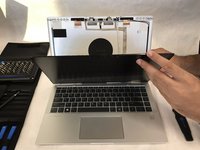
    • Using the jimmy tool pry outward on the screen display, starting near one of the top corners.

    • Carefully pry along the perimeter of the display until the screen can be easily removed.

    • Lay the screen face down on the keyboard for the next step.

  3. HP Elitebook x360 1040 G5 Screen display Replacement: 3 단계, 이미지 2개 중 1개 HP Elitebook x360 1040 G5 Screen display Replacement: 3 단계, 이미지 2개 중 2개
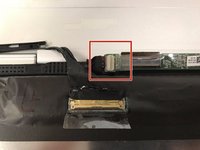
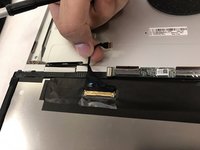
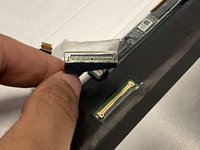
    • Carefully remove the clear adhesive protector from the smallest ribbon cable, located closest to the laptop hinge.

    • Gently slide the connector out of the harness, moving it towards the side of the laptop with the power button.

  4. HP Elitebook x360 1040 G5 Screen display Replacement: 4 단계, 이미지 3개 중 1개 HP Elitebook x360 1040 G5 Screen display Replacement: 4 단계, 이미지 3개 중 2개 HP Elitebook x360 1040 G5 Screen display Replacement: 4 단계, 이미지 3개 중 3개
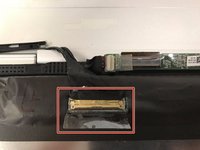
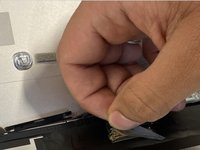
    • Carefully remove the clear adhesive protector from the last ribbon cable, located on the large black strip on the back of the screen display.

    • Gently remove the ribbon cable from the harness by moving it toward the laptop hinge.

  5. HP Elitebook x360 1040 G5 Screen display Replacement: 5 단계, 이미지 3개 중 1개 HP Elitebook x360 1040 G5 Screen display Replacement: 5 단계, 이미지 3개 중 2개 HP Elitebook x360 1040 G5 Screen display Replacement: 5 단계, 이미지 3개 중 3개
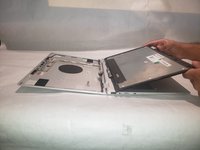
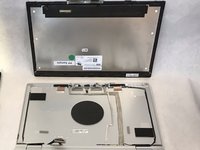
    • Remove the screen from the laptop.

결론

To reassemble your device, follow these instructions in reverse order.

다른 한 분이 해당 안내서를 완성하였습니다.

작성자

2다른 기여자 명과 함께

Tyler A Cobb

회원 가입일: 09/03/19

321 평판

안내서 2개를 작성함

IUPUI, Team S1-G1, Hovde Fall 2019 IUPUI, Team S1-G1, Hovde Fall 2019 회원

IUPUI-HOVDE-F19S1G1

3 회원들

안내서 4개를 작성함

0가이드 댓글

댓글 쓰기

조회 통계:

지난 24시간: 1

지난 7일: 18

지난 30일: 64

전체 시간: 2,351