주요 콘텐츠로 건너뛰기

HP Envy 23-d060qd TouchSmart Fan Replacement

필요한 것

  1. HP Envy 23-d060qd TouchSmart Fan Replacement, Back Panel: 1 단계, 이미지 1개 중 1개
    • Use your hands to unclip the plastic snaps on the back panel of the device.

  2. HP Envy 23-d060qd TouchSmart Fan Replacement: 2 단계, 이미지 1개 중 1개
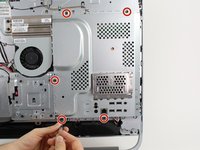
    • Remove the three 11.5mm PH2 screws from the back panel.

    • The screws will not fall out of the back panel, but they will unscrew to release the back panel.

  3. HP Envy 23-d060qd TouchSmart Fan Replacement: 3 단계, 이미지 1개 중 1개
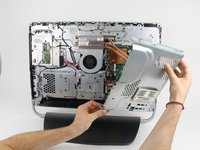
    • Now, take the back panel off by pulling at it gently with your hands.

  4. HP Envy 23-d060qd TouchSmart Fan Replacement, Fan: 4 단계, 이미지 2개 중 1개 HP Envy 23-d060qd TouchSmart Fan Replacement, Fan: 4 단계, 이미지 2개 중 2개
    • Remove the five 7.5mm T15 screws from the cover plate.

    • Remove the cover plate.

  5. HP Envy 23-d060qd TouchSmart Fan Replacement: 5 단계, 이미지 2개 중 1개 HP Envy 23-d060qd TouchSmart Fan Replacement: 5 단계, 이미지 2개 중 2개
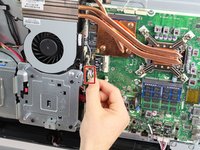
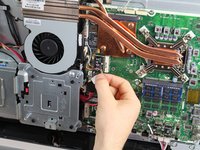
    • Use your hands to separate the fan's wired connection to the motherboard. Use your hands to gently pull the plastic piece at the ends of the wires.

    • Be gentle when you separate wired connections. Pulling on the wires can damage them.

  6. HP Envy 23-d060qd TouchSmart Fan Replacement: 6 단계, 이미지 1개 중 1개
    • Remove the three 8mm T15 screws from the fan.

  7. HP Envy 23-d060qd TouchSmart Fan Replacement: 7 단계, 이미지 1개 중 1개
    • Pull the fan loose from the computer.

결론

To reassemble your device, follow these instructions in reverse order.

다른 3명이 해당 안내서를 완성하였습니다.

작성자

6다른 기여자 명과 함께

Zachary Dicks

회원 가입일: 10/01/15

1,166 평판

안내서 7개를 작성함

Cal Poly, Team 5-10, Maness Fall 2015 Cal Poly, Team 5-10, Maness Fall 2015 회원

CPSU-MANESS-F15S5G10

4 회원들

안내서 14개를 작성함

0가이드 댓글

댓글 쓰기

조회 통계:

지난 24시간: 2

지난 7일: 10

지난 30일: 29

전체 시간: 4,104